

Updated · Originally published
Microsoft Dynamics 365 Implementation Guide:
is a suite of ERP and CRM business applications. It's designed to provide businesses with integrated, end-to-end solutions that streamline various business processes, enhance customer engagement, and drive growth.
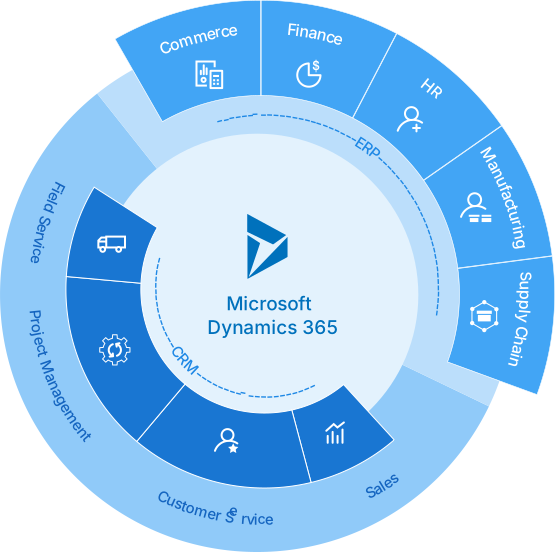
Here's a brief overview of Dynamics 365 key aspects:
- Integrated Applications: Dynamics 365 combines various business functions such as sales, marketing, service, finance, operations, and commerce into a cohesive platform. This integration allows for seamless data flow across departments, improving efficiency and decision-making.
- Flexibility and Scalability: One of the core strengths of Dynamics 365 is its flexibility. It caters to businesses of all sizes and can be scaled as a company grows. Businesses can start with what they need and add applications as their needs change.
- Cloud-Based Platform: Being cloud-based, Dynamics 365 offers the advantages of high availability, security, and reduced IT overhead. It allows employees to access information anytime, anywhere, fostering a more agile and responsive business environment.
- Advanced Analytics and AI: Dynamics 365 integrates with Microsoft's AI and analytics capabilities, providing businesses with actionable insights. These tools help in forecasting trends, personalizing customer experiences, and optimizing operations.
- Customization and Integration: The platform is highly customizable, allowing businesses to tailor solutions to their specific needs. It also integrates smoothly with other Microsoft products like Office 365 and Azure, as well as with third-party applications.
- User-Friendly Interface: Dynamics 365 is known for its intuitive user interface, which is easy to navigate and use. This enhances user adoption and reduces the learning curve for new users.
The effective implementation of Microsoft Dynamics 365 is crucial for maximizing the benefits it offers to any organization.
Here's why:
- Alignment with Business Objectives: Proper implementation ensures that the Dynamics 365 system aligns with the specific goals and processes of the business. This alignment is key to realizing the full potential of the system in terms of efficiency, productivity, and return on investment.
- Data Integrity and Management: A well-executed implementation includes proper data migration and setup, which are essential for maintaining data integrity. Clean, well-organized, and correctly migrated data is fundamental for accurate reporting, analytics, and decision-making.
- User Adoption and Productivity: Effective implementation includes comprehensive training and support, leading to higher user adoption rates. When employees are comfortable and proficient with the new system, productivity increases, and the organization can fully leverage the capabilities of Dynamics 365.
- Customization and Scalability: Dynamics 365 offers extensive customization options to meet unique business needs. An effective implementation tailors these options to optimize workflows and processes. Additionally, it considers future scalability to accommodate business growth and evolving requirements.
- Cost Efficiency: Proper implementation helps avoid common pitfalls such as redundant functionalities, underutilized features, or extended deployment times, all of which can lead to unnecessary costs. Efficient implementation streamlines the process, ensuring a quicker and more cost-effective transition.
- Risk Mitigation: A well-planned implementation strategy helps in identifying and mitigating potential risks, such as system downtime, data loss, or security breaches, ensuring a smooth transition to the new system.
- Competitive Advantage: By effectively implementing Dynamics 365, businesses can quickly benefit from its advanced features like AI, machine learning, and real-time analytics, gaining a competitive edge in the market.
Understanding Your Business Needs
It's essential to ensure that the implementation of Microsoft Dynamics 365 aligns perfectly with your business needs. This alignment is crucial for maximizing the system's benefits and achieving your organizational goals. Here's how to approach this:
Assessing Business Requirements and Goals
- Conducting a Thorough Analysis: Begin by conducting a detailed analysis of your current business processes, systems, and challenges. This step involves gathering data on various aspects of your operations, including sales, customer service, finance, and more.
- Identifying Specific Needs: Based on the analysis, identify specific business needs and areas where Dynamics 365 can bring improvements. This could include automating processes, improving customer relationship management, or gaining better insights from data.
- Setting Clear Goals: Establish clear, measurable goals for what you want to achieve with Dynamics 365. These goals should be specific, achievable, and aligned with your overall business strategy.
Aligning Dynamics 365 Features with Business Objectives
- Mapping Features to Needs: Once you understand your needs and goals, map them to the specific features and capabilities of Dynamics 365. This step ensures that each aspect of the software is utilized to address a particular business requirement.
- Customization for Best Fit: Consider customizing Dynamics 365 to better fit your unique business processes. Dynamics 365's flexibility allows for tailored solutions that can more effectively meet your specific needs.
- Planning for Future Growth: Ensure that the Dynamics 365 implementation is scalable and adaptable to future business changes and growth. This foresight will protect your investment and support long-term business objectives.
Importance of Stakeholder Involvement
- Engaging Key Stakeholders: Involve key stakeholders from various departments in the planning and implementation process. Their insights and feedback are invaluable in ensuring that the system meets the diverse needs of your organization.
- Fostering Buy-In and Support: Gaining buy-in from stakeholders, especially from decision-makers and end-users, is crucial for successful implementation. Their support can significantly influence user adoption and the overall success of the project.
- Continuous Communication: Maintain open and continuous communication with all stakeholders throughout the implementation process. This approach helps in managing expectations, addressing concerns, and ensuring that everyone is aligned with the project's objectives.
Choosing the Right Team for Dynamics 365 Implementation
Implementing Microsoft Dynamics 365 successfully requires assembling a team with the right mix of skills and expertise. Here’s how to build an effective implementation team:
Roles and Responsibilities in the Implementation Team
- Project Manager: Leads the project, ensuring that it stays on track with timelines, budget, and scope. The project manager also coordinates between different team members and stakeholders.
- Business Analysts: Responsible for understanding business processes and requirements, and translating them into system specifications. They play a crucial role in ensuring that Dynamics 365 aligns with business needs.
- IT Specialists/Technical Experts: Handle the technical aspects of Dynamics 365 implementation, including system configuration, customization, and integration with other systems.
- Data Specialists: Focus on data migration, management, and integrity. They ensure that data is accurately transferred to the new system and that it remains secure and consistent.
- Training and Support Staff: Develop and deliver training programs for end-users and provide ongoing support post-implementation.
- Change Management Lead: Manages the organizational change associated with the new system, helping staff adapt to and embrace Dynamics 365.
Importance of Cross-Functional Collaboration
- Breaking Down Silos: Encourage team members from different departments to work together. This collaboration ensures that the system meets the diverse needs of the entire organization.
- Leveraging Diverse Perspectives: Cross-functional collaboration brings together diverse perspectives, leading to more innovative solutions and better problem-solving.
- Ensuring Comprehensive Understanding: It helps in ensuring that all aspects of the business are considered in the implementation, leading to a more holistic and effective system.
Selecting Internal Champions and External Partners
- Identifying Internal Champions: Choose enthusiastic and influential team members who can drive Dynamics 365 adoption within their departments. These champions can motivate others and facilitate smoother change management.
- Choosing the Right External Partners: If needed, partner with external experts such as Microsoft-certified consultants or implementation partners. They bring specialized knowledge and experience that can be crucial for complex implementations.
- Balancing Internal and External Expertise: Ensure a balance between internal knowledge of your business and external technical expertise. This balance is key to tailoring Dynamics 365 to your specific needs while ensuring best practices are followed.
Data Management & Migration
Effective data management and migration are pivotal for the successful implementation of Microsoft Dynamics 365. Here's how to approach this critical phase:
Strategies for Data Cleaning and Preparation
- Conducting a Data Audit: Begin with a thorough audit of your existing data. Identify what data needs to be moved, its sources, and its current state in terms of quality and structure.
- Cleaning Data: Address data quality issues such as duplicates, incomplete records, and inconsistencies. This step is crucial for ensuring the accuracy and reliability of data in the new system.
- Data Mapping: Map your data fields from the old system to the new Dynamics 365 system. This process involves determining how and where each piece of data will be stored in Dynamics 365.
- Test Migration: Conduct a test migration with a subset of your data. This practice helps in identifying potential issues before the full-scale migration.
Best Practices for Data Migration
- Develop a Detailed Migration Plan: Create a comprehensive plan that outlines each step of the migration process, including timelines, responsibilities, and contingency plans.
- Use the Right Tools: Utilize appropriate tools and technologies for data migration. Dynamics 365 offers tools for data import, but in some cases, additional tools may be needed for complex migrations.
- Monitor and Document the Process: Keep a close eye on the migration process. Documenting the process helps in tracking progress and provides a reference for future migrations.
- Post-Migration Validation: After migration, validate the data to ensure that it has been accurately transferred and is functioning as expected in the new system.
Ensuring Data Integrity and Security
- Maintain Data Integrity: Ensure that the data maintains its accuracy and consistency during and after the migration. This involves checking for data corruption, loss, or duplication.
- Implement Robust Security Measures: Protect your data during the migration process. Use secure data transfer methods and ensure that Dynamics 365’s security features are properly configured.
- Compliance with Regulations: Ensure that your data migration process complies with relevant data protection regulations such as GDPR, HIPAA, etc.
- Employee Training: Train your employees on the importance of data integrity and security. They should understand their roles in maintaining these aspects in Dynamics 365.
Customization and Integration
Implementing Microsoft Dynamics 365 isn't just about adopting a new system; it's about making it work effectively for your unique business needs. Customization and integration are key components of this process. Here's how to approach them:
Tailoring Dynamics 365 to Fit Unique Business Processes
- Identifying Specific Requirements: Start by identifying the specific requirements of your business that are not met by Dynamics 365's out-of-the-box features. This could involve unique workflows, reporting needs, or business rules.
- Customizing Solutions: Utilize Dynamics 365's customization tools to modify the system. This can include creating custom fields, forms, entities, and workflows that align with your specific business processes.
- Engaging with Users: Involve end-users in the customization process. Their input is invaluable in ensuring that the system meets their day-to-day operational needs.
Integrating with Existing Systems and Third-Party Applications
- Assessing Integration Needs: Determine which existing systems and third-party applications need to be integrated with Dynamics 365. Common integrations include email services, accounting software, and customer service tools.
- Using Standard and Custom Integrations: Leverage Dynamics 365’s built-in integration capabilities. For more complex needs, consider developing custom integrations or using middleware.
- Ensuring Seamless Data Flow: The goal of integration is to ensure seamless data flow and functionality across systems. This reduces data silos and enhances overall efficiency.
Balancing Customization with Future Scalability
- Avoiding Over-Customization: While customization can make Dynamics 365 more effective for your current needs, over-customization can hinder future updates and scalability. Strive for a balance that meets current needs but doesn’t overly complicate the system.
- Planning for Future Needs: Consider how your business might evolve in the future and how those changes might impact your Dynamics 365 setup. Build a system that can grow and adapt with your business.
- Regularly Reviewing and Updating: As Dynamics 365 evolves with new updates and features, regularly review your customizations and integrations. Ensure they are still necessary and effective, and update them as needed to take advantage of new capabilities.
User Training and Adoption for Microsoft Dynamics 365 Implementation
Successful implementation of Microsoft Dynamics 365 not only depends on the technical aspects of the system but also heavily relies on how well users adopt and adapt to it. Here’s how to ensure effective user training and adoption:
Developing a Comprehensive Training Plan
- Assessing Training Needs: Start by assessing the training needs of different user groups within your organization. Different roles may require different levels of training based on their interaction with Dynamics 365.
- Creating a Structured Training Program: Develop a structured training program that covers all essential aspects of Dynamics 365. This should include basic navigation, specific job-related functions, and advanced features for power users.
- Utilizing Various Training Methods: Incorporate a mix of training methods such as in-person training sessions, online tutorials, webinars, and hands-on workshops. This variety caters to different learning styles and schedules.
Techniques for Encouraging User Adoption
- Communicating Benefits: Clearly communicate the benefits of Dynamics 365 to users. Understanding how the new system makes their work easier and more efficient can motivate users to embrace the change.
- Involving Users Early: Involve users early in the implementation process. Getting their input and addressing their concerns can lead to higher acceptance and smoother transition.
- Creating a Supportive Environment: Encourage a culture where users feel supported in learning the new system. This can include having 'super users' or champions who can provide peer support.
Continuous Support and Feedback Mechanisms
- Establishing a Support System: Set up a support system for post-training assistance. This could be a help desk, online resources, or a dedicated team for Dynamics 365 support.
- Gathering Feedback: Regularly gather feedback from users about the system and the training they received. This feedback is crucial for identifying areas for improvement.
- Providing Ongoing Training and Updates: As Dynamics 365 evolves, provide ongoing training sessions to keep users updated on new features and best practices.
- Monitoring Usage and Adoption Rates: Use analytics tools to monitor how users are engaging with Dynamics 365. This data can help identify areas where additional training or support may be needed.
Testing and Quality Assurance
Ensuring the reliability and effectiveness of Microsoft Dynamics 365 after implementation is crucial. This phase involves rigorous testing and quality assurance. Here's how to approach it:
Importance of Thorough Testing Before Going Live
- Identifying and Resolving Issues: Testing helps identify and resolve any issues in the system before it goes live. This is crucial to avoid disruptions in business operations.
- Ensuring System Compatibility: Testing ensures that Dynamics 365 is compatible with other systems and workflows in your organization.
- Validating Functionality: It’s important to validate that all functionalities work as intended and meet the defined requirements and business needs.
Strategies for Effective Testing and Validation
- Developing a Testing Plan: Create a comprehensive testing plan that covers all aspects of Dynamics 365, including individual modules, integrations, data migration, and user workflows.
- Using a Staged Approach: Start with unit testing of individual components, followed by integration testing, system testing, and finally user acceptance testing (UAT).
- Involving End Users: Include end users in the testing process, especially during UAT. Their feedback is invaluable as they are the ones who will use the system daily.
- Automating Where Possible: Use automated testing tools for repetitive and data-intensive tests. This can save time and ensure thorough coverage.
Dealing with Potential Issues and Bugs
- Establishing a Reporting Process: Set up a clear process for reporting issues and bugs. This should include who to report to, how to document the issue, and the process for tracking resolution.
- Prioritizing Issues: Once issues are reported, prioritize them based on their impact on business operations and the complexity of the fix.
- Iterative Fixes and Retesting: Implement fixes in an iterative manner. After each fix, retest the system to ensure that the issue is resolved and that no new issues have been introduced.
- Preparing for Rollback: In case of critical issues, be prepared with a rollback plan to revert to the previous system while the issues are being addressed.
Going Live and Post-Implementation Support for Microsoft Dynamics 365
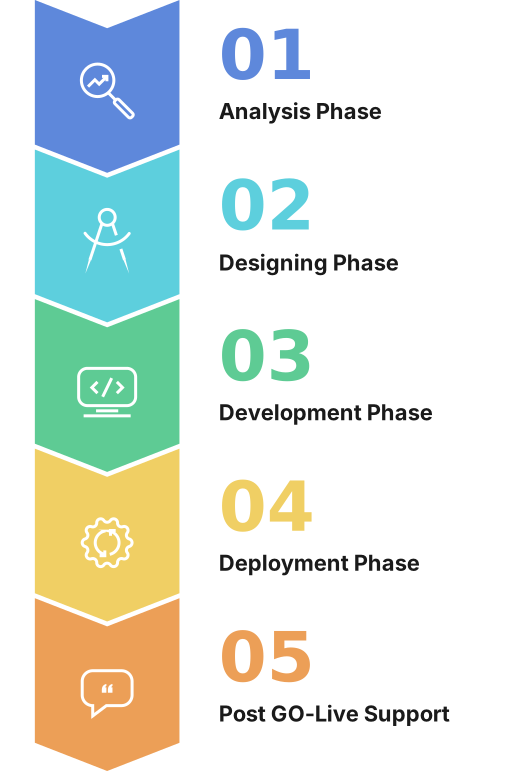
Successfully launching Microsoft Dynamics 365 and ensuring its ongoing effectiveness involves meticulous planning and continuous support. Here's a guide to managing the go-live phase and providing post-implementation support:
Planning for a Smooth Transition to the New System
- Final Preparations: Before going live, ensure all systems are thoroughly tested, data is migrated accurately, and users are trained. Address any last-minute concerns or issues.
- Communication Plan: Develop a clear communication plan to inform all stakeholders about the go-live schedule, what to expect, and whom to contact for support.
- Go-Live Support Team: Assemble a dedicated go-live support team that includes IT staff, Dynamics 365 experts, and key project team members to address any immediate issues that may arise during the transition.
- Backup Plans: Have a rollback plan in place in case critical issues emerge that cannot be resolved quickly, ensuring business continuity.
Post-Implementation Review and Support
- Initial Review: Conduct an initial post-go-live review to assess system performance and identify any immediate issues or gaps in user knowledge.
- Ongoing Support Structure: Establish a support structure for users to address their queries and issues. This could include a help desk, user forums, or direct access to a Dynamics 365 support team.
- Feedback Mechanism: Implement a feedback mechanism to gather user experiences and suggestions. This feedback is vital for identifying areas for improvement.
Continuous Improvement and Updates
- Monitoring and Optimization: Regularly monitor the system’s performance and user adoption. Use this data to optimize the system for better performance and usability.
- Staying Current with Updates: Keep the system up-to-date with the latest Dynamics 365 updates and features. Regular updates not only bring new functionalities but also address security and performance issues.
- Continuous Training: Provide continuous training opportunities for users to keep them informed about new features and best practices. This can include workshops, webinars, and online training modules.
- Long-Term Improvement Plan: Develop a long-term plan for continuous improvements based on evolving business needs, user feedback, and innovative technologies.
Stay tuned for more insights and updates in the world of business solutions. Until next time, keep innovating and reaching for new heights in your business journey!
Great guide on Microsoft Dynamics 365 implementation! It's clear and informative, offering practical insights for businesses looking to streamline their processes with Dynamics 365. Finding the right Dynamics 365 Implementation Partner is crucial for success, and your guide touches on important factors to consider in choosing one. I appreciate the detailed steps and recommendations provided. Looking forward to more insightful posts like this!