

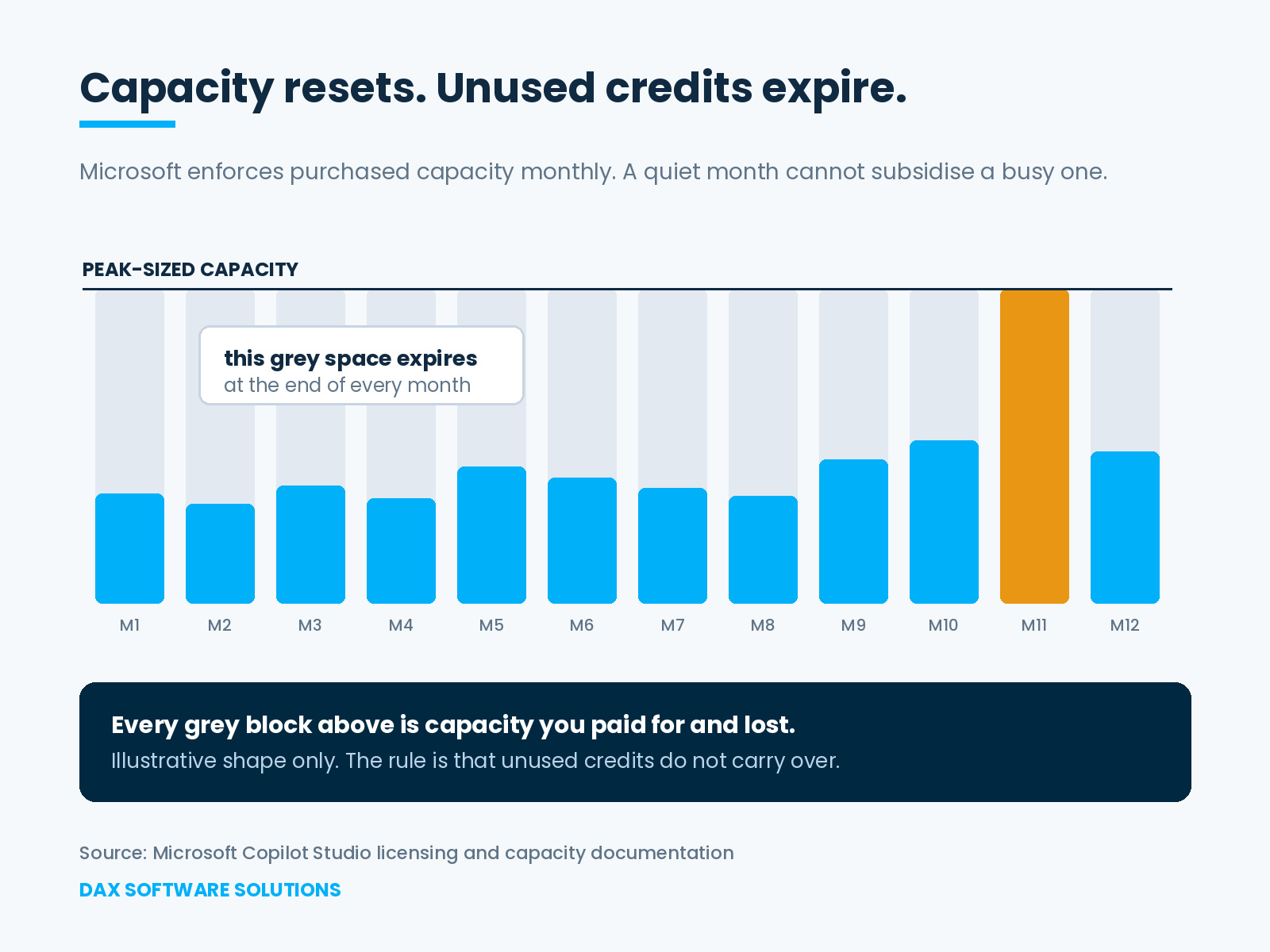
Copilot Credits capacity runs on a monthly cycle, and unused credits expire at the end of it. That single rule removes the option finance reaches for first, because a quiet March can no longer subsidise a busy November. Copilot Credits capacity planning then splits in two, and both answers cost you. Buying for the peak means overpaying for eleven months. Buying for the average means one bad month. There is a third answer, and it is in Microsoft's own documentation.
What does "enforced monthly" actually mean?
It means capacity resets on a monthly cycle and anything unspent is gone. Microsoft states that Copilot Studio enforces purchased capacity monthly and that unused Copilot Credits do not carry over to the next month. Microsoft's own description of pay-as-you-go makes the same point from the other side, presenting it as an end to unused capacity expiring at the end of the month.
Two further details shape how the number behaves. Purchased credits pool across the tenant, and an administrator has to assign them to an environment before agents there can use them. Capacity bought but never allocated behaves exactly like capacity never bought.
What happens when you run out?
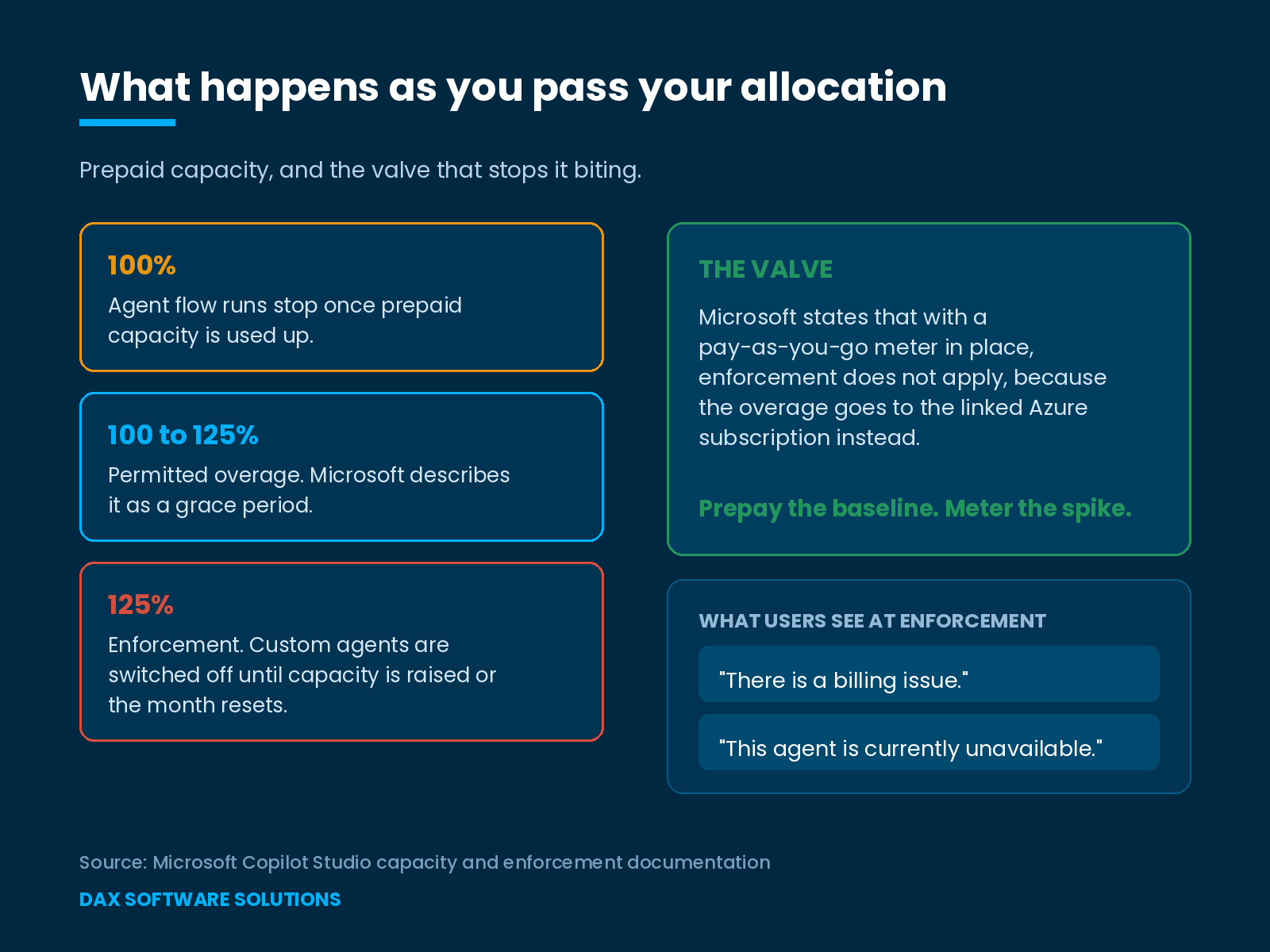
Not an instant stop, and not an invoice either. Microsoft permits some overage, describing it as a grace period to avoid blocking business processes.
Enforcement triggers when a tenant reaches 125 percent of prepaid capacity. Custom agents are then disabled. An ongoing conversation finishes, and every subsequent attempt to invoke the agent fails until someone increases capacity or the month resets. Microsoft sends an email to the tenant's designated administrator and posts a notification in the Power Platform admin center.
Users see one of two messages: that there is a billing issue, or that the agent is currently unavailable because it has reached its usage limit.
Agent flows behave differently and more strictly. Once an environment uses up its prepaid capacity, new agent flow runs stop, without waiting for the 125 percent threshold. Microsoft notes that this enforcement resets monthly when prepaid credits renew.
Why is buying for the peak expensive?
Because you pay for the busiest month twelve times and use it once. If November runs at three times a quiet month, peak-sized capacity leaves roughly two-thirds of it unused across most of the year. A carry-over model would return that waste to you later. Under monthly enforcement it simply expires twelve times a year, which is the detail that turns conservative sizing into a standing cost rather than a prudent buffer.
Why is buying for the average risky?
Because the failure does not look like a budget problem to anyone who meets it. An agent that stops answering in the week it matters most reads to the business as a broken product. The messages users receive mention a billing issue or a usage limit, which means the licensing decision becomes visible to people who were never part of it. That is a reputational cost on top of a commercial one, and it lands on the team that championed the agent.
What does the gap look like in numbers?
Work it through with Microsoft's published rate, and the shape becomes obvious. This is illustrative arithmetic, not a benchmark. Take an agent whose work is mostly generative answers, billed at 2 Copilot Credits each. A quiet month runs 20,000 answers, so 40,000 credits. The busiest month runs 60,000 answers, so 120,000 credits. Most months sit near 25,000 answers, or 50,000 credits.
Size for the peak and you prepay 120,000 credits every month, which is 1.44 million across the year against perhaps 650,000 consumed. More than half of what you bought expires unused, month after month. Size for the average and you prepay 50,000. The busy month needs 120,000, which is 240 percent of your allocation. Enforcement triggers at 125 percent, so the agent switches off well before the month ends.
Neither number is wrong. The Copilot Credits capacity model just makes both of them costly in different ways.
The third option most teams miss
Microsoft lists three responses when an environment runs out of capacity: reallocate existing capacity from the tenant or another environment, purchase more capacity, or set up a consumptive or pay-as-you-go meter to handle the overage.
The third one changes the shape of the decision. Microsoft states that with pay-as-you-go enabled, enforcement does not apply, because the overage goes to the linked Azure subscription instead. In Microsoft's worked example, a tenant-wide overage leaves one environment untouched: the one holding a small prepaid allocation plus a pay-as-you-go meter.
So the real design is a baseline plus a valve. Prepay the Copilot Credits capacity you can predict, and let a metered environment absorb the rest. Microsoft also distinguishes the two. Prepaid environments must stay within their allocated pool. Pay-as-you-go environments take any limit you set and charge usage bills accordingly.
How do you size Copilot Credits capacity in practice?
Five questions, answered before renewal rather than after an incident:
- What does a unit of work actually cost, given that a classic answer is 1 credit, a generative answer 2, an agent action 5, tenant graph grounding 10, and agent flow actions 13 per 100?
- How many of your users hold a Microsoft 365 Copilot licence, since Microsoft states those interactions carry no charge?
- What is the ratio between your busiest month and your quietest, rather than your annual total?
- Is every purchased credit actually allocated to an environment, and is it allocated to the right one?
- Which environments should carry a pay-as-you-go meter so that a spike bills rather than blocks?
Question two is the one that most changes the arithmetic, and it is rarely in the first version of the forecast.
Frequently asked questions:
1. Do unused Copilot credits roll over to the next month?
No. Microsoft states that Copilot Studio enforces purchased capacity monthly and that unused credits do not carry over.
2. At what point are agents switched off?
Enforcement triggers at 125 percent of prepaid capacity, after a permitted overage period. Agent flows stop earlier, as soon as an environment uses up its prepaid capacity.
3. Is there a way around enforcement?
Microsoft states that where a pay-as-you-go meter is in place, enforcement does not apply, because the overage goes to the linked Azure subscription.
4. Do Microsoft 365 Copilot licence holders consume credits?
Microsoft's billing table shows no charge for these features when used by a Microsoft 365 Copilot licensed user. That links straight to .
5. What to do before the next renewal
Treat Copilot Credits capacity as a false choice between peak and average, and design the valve instead. The decision worth making is how much of your demand is predictable enough to prepay, and what catches the rest. It belongs beside the other .
Microsoft's is informational and licensing terms change. Confirm rates, thresholds and meters against your agreement with Microsoft or the partner holding your contract before committing budget.
At DAX Software Solutions, agent sizing is part of how we scope agentic work, because the month an agent stops answering is usually the month it was proving its value. If nobody has modelled your Copilot Credits capacity against your busiest month, .