

ERP migrations come with a long checklist. You have new workflows to configure, teams to train, and data to move. One question often gets pushed to the back burner until it becomes too urgent to ignore: what do you do with your historical data?
Why This Matters
When you migrate to a new ERP, some data makes the move with you. Customer records, open transactions, and your chart of accounts are all active data that your business runs on day to day. You would move that with a tool like . However, historical data like audit history, closed transactions, and inactivated items are data that your business no longer operates on, but still needs access to.
Your historical data may include references to employees who don’t work for the company anymore, items that have been discontinued, or a chart of accounts that has been completely rebuilt. Importing all of that is expensive, time-consuming, and bogs down your new system. Your best option is to store that historical data somewhere else and retain access to it through Popdock.
The Four Approaches
The real question is, where should that data live? There are four main approaches, each with its own tradeoffs. The right one depends on your data volume, budget, and reporting requirements.
1.) Leave the Data in the Existing System
The simplest option is to leave your historical data exactly where it is; no migration, and no new infrastructure required. Just integrate around your existing system and use to surface that data wherever you need it.
This approach works well when your source system isn’t going anywhere, your reporting needs are relatively light, or your team isn’t prepared to add new platforms. It’s especially appealing for organizations that want to minimize disruption during the transition.
The catch is the ongoing cost. Keeping an old system running means maintaining the infrastructure, security, and compliance requirements that come with it. Query performance is also limited by the source system itself, and you won’t be able to consolidate data across multiple systems without additional work.
This may be the best fit if you’re thinking: “We just need to be able to see the data,” or “IT doesn’t want to manage another system.”
2.) Store the Data in a Data Lake or Cloud Storage
For organizations with large historical archives, cloud storage is often the most cost-effective solution. Your data is exported and typically stored either as CSV or Parquet files in platforms like Azure Blob Storage, Amazon S3, or Google Cloud Storage.
The simplest version of this approach is direct file access, which is cheap and easy to set up. The tradeoff is that querying large CSV files can be slow and create bottlenecks, especially as data volume grows. Adding a SQL layer on top through tools like Azure Synapse or Google BigQuery addresses that limitation and allows you to filter and retrieve only the data you need more efficiently.
A quick note on file formats: If you go the data lake route, the format you choose matters more than you think.
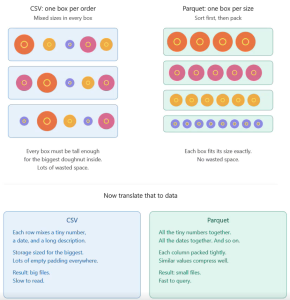
CSV files store data row by row, mixing different data types together. They’re easy to open and read, but inefficient to query at scale. Pulling records out of a large CSV means reading through the whole file.
Parquet files organize data by column, grouping similar values together. This makes them much faster to query and significantly smaller in storage size due to compression. Parquet files aren’t human-readable and require a tool like Popdock to access them, but for most companies archiving historical ERP data, this is worth the extra step.
This may be the best fit if you’re thinking: “We need to archive 10+ years of data,” or “We already use Azure, AWS, or GCP.”
3.) Move the Data to a Hosted Database
A managed SQL database like Asure SQL, AWS RDS, or Google Cloud SQL, is a familiar structured option for companies with more intensive reporting needs. You take a backup of your existing database and host it in the cloud, where the vendor handles patching, backups, and maintenance.
This option is a natural fit if your BI tools expect a SQL connection, your team already has database skills, or you have reporting workloads that go beyond basic historical lookups. It offers more query flexibility than flat file storage and integrates cleanly with most reporting tools.
The downside is cost. With hosted databases, you’re paying for capabilities that historical, read-only data doesn’t really need. For most small to mid-size organizations, this is more infrastructure than necessary, but if your team is already comfortable in SQL and your reporting requirements justify it, it’s a solid choice.
This may be the best fit if you’re thinking: “We need a proper reporting database,” or “Our team knows T-SQL."
4.) Move the Data to a Modern Data Platform
If your organization is already investing in enterprise analytics, this may be the best option for you. Cloud-native warehouses, like Snowflake or Microsoft Fabric, scale efficiently with data volume and come with built-in governance and data sharing capabilities.
This approach is most common at the enterprise level, especially for organizations consolidating data from multiple ERPs. If you have a BI team already working in one of these environments, connecting your historical ERP data to that ecosystem makes a lot of sense.
That said, this is the highest-cost and highest-complexity option on the list. It requires data engineering discipline and meaningful platform buy-in. For a company that simply needs to keep access to historical records, it’s likely overkill.
This may be the best fit if you’re thinking: “We’re standardizing on Snowflake or Fabric,” or “Analytics is a strategic priority for us.”
Choosing the Right Approach
Selecting the right solution will depend on your business’s needs, including how much data you’re working with, what your budget is, and if you have an internal team already using BI platforms.
No matter which option works best for you, the eOne iPaaS is here to make sure you retain data access throughout your migration and beyond. Popdock connects to all four of these storage approaches, so your teams can search, filter, and surface historical records from within whatever platform they’re already working in. When it comes time to actually move your data, SmartConnect handles the migration side seamlessly.
ERP migrations are complicated enough without having to worry about your historical data. If you’re not sure which approach is the right fit, talk to a team that’s navigated this before. to learn more about your options.