

Updated · Originally published
In the realm of digital transformation, businesses today are increasingly reliant on comprehensive solutions like . However, as your business grows, so does your data. Dynamics 365's storage, while robust, might not always be enough for businesses with large data sets.
This is where comes in, ensuring that your applications stay fast and efficient, thereby preventing a loss in productivity.
The Need for More Dynamics 365 Storage
As you continually use Dynamics 365, your data size expands. Documents, records, transactions - they all add up, and before you know it, you're bumping up against your storage limit. What happens then? The application begins to slow down, affecting efficiency and potentially impacting your business operations.
For companies dealing with substantial data volumes, the storage capacity of Dynamics 365 might not suffice, leading to slower applications and a subsequent loss in productivity. The solution? Microsoft Azure integration for expanded storage.
In a world where every second counts, slower applications can lead to a loss of productivity, creating a ripple effect on your profitability and business reputation. And that's a scenario no business wants to face.
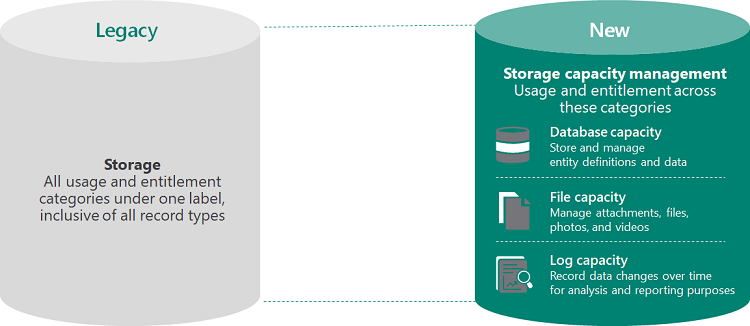
Dynamics 365 offers three types of storage: database storage, file storage, and log storage, each serving a different purpose.
- Database Storage: This is where the core data of your Dynamics 365 applications reside. Additional database storage for Dynamics 365 costs $40 per GB per month.
- File Storage: This storage type is used for attachments like photos and other documents. The cost of additional file storage is $2 per GB per month.
- Log Storage: This stores data used for auditing and analytics purposes. The cost for additional log storage is $10 per GB per month.
Understanding Dynamics 365 Storage
Dynamics 365, Microsoft's suite of intelligent business applications, is an all-in-one business solution, but its storage capabilities have certain limitations. Each Dynamics 365 instance comes with a predetermined amount of storage, which, once exceeded, can lead to operational hiccups. Effective data management thus becomes crucial to ensure smooth application performance and avoid potential service disruptions.
The Solution: Azure Storage
Microsoft Azure offers the solution to your storage woes. By integrating Azure with Dynamics 365, you can significantly increase your storage capacity, ensuring that your business applications run smoothly, no matter how much your data grows.
Azure's cloud storage is not only scalable but also secure and reliable. It integrates seamlessly with Dynamics 365, providing an easy solution to your growing storage needs. Plus, the process of buying additional storage on Azure is quick and straightforward, meaning you can boost your storage capacity without missing a beat.
Best Practices for Managing Dynamics 365 Storage
Effective data management is crucial to leveraging additional storage for optimum results. Here are some tips for managing your Dynamics 365 storage:
- Regularly monitor your storage use: Keeping a close eye on your storage consumption will help you anticipate when you might need to expand your storage capacity.
- Implement a data archiving strategy: Archiving older data that are not frequently used can free up a significant amount of storage space.
- Conduct regular audits: Regular audits can help you identify unnecessary data and keep your storage optimized.
| Metrics | Before Storage Expansion | After Storage Expansion |
|---|---|---|
| Application Load Time | 12 seconds | 4 seconds |
| Data Retrieval Time | 9 seconds | 3 seconds |
| Data Upload Time | 10 seconds | 5 seconds |
| Data Processing Time | 15 seconds | 7 seconds |
| System Response Time | 7 seconds | 2 seconds |
| Daily Downtime | 2 hours | 30 minutes |
| Employee Productivity | 80% | 95% |
*Please note that the actual values will differ based on specific circumstances and the exact performance metrics relevant to your organization.
Here's How You Do It
- Log in to your .
- Select the storage account you want to expand.
- Specify the additional storage capacity you need.
- Follow the checkout process, and voila, your additional storage is ready to go!

While Azure integration with Dynamics 365 can enhance your storage capacity, it’s important to note that this process may not always be as straightforward as it seems. It requires an in-depth understanding of both Dynamics 365 and Azure, as well as how they work together. That's where a Dynamics 365 partner comes in.
Scale your D365 storage with a Dynamics 365 partner:
- Reach out to a Dynamics 365 Partner: , such as Dynamics Square, have a thorough understanding of the intricacies involved in integrating Azure storage with Dynamics 365. Reach out to them with your needs and concerns.
- Assessment of your Storage Needs: The Dynamics 365 partner will conduct a comprehensive assessment of your current storage usage and future requirements. They'll understand your business model, data flow, and projected growth to estimate the additional storage capacity needed.
- Customized Integration Plan: Based on the assessment, the partner will devise a tailored Azure integration plan for your Dynamics 365. This includes specifying the additional storage space needed, planning the integration process, and ensuring it aligns with your business operations.
- Implementation: The Dynamics 365 partner will carry out the integration process, ensuring that additional Azure storage is seamlessly integrated with your Dynamics 365. They'll handle the complex technical aspects, allowing you to focus on your core business activities.
- Continued Support and Monitoring: After successful integration, the Dynamics 365 partner will continue to monitor your storage usage and offer support. They will advise on data management best practices and assist in further scaling your storage as your business grows.
How Dynamics Square Can Help
As a reliable Microsoft Dynamics 365 partner, Dynamics Square specializes in providing tailored solutions to businesses, ensuring they get the most out of their . When it comes to expanding your storage capacity, Dynamics Square has the expertise to facilitate this process smoothly and efficiently.
Dynamics Square helps businesses scale their storage needs:
- Storage Assessment: Dynamics Square's team of experts will first conduct a comprehensive assessment of your current storage usage. This helps in understanding your specific needs and forecasting future storage requirements based on your business growth trends.
- Tailored Azure Integration Plan: Post assessment, Dynamics Square creates a customized Azure integration plan for your business. This plan will detail the amount of additional Azure storage required and the best way to integrate it with your existing Dynamics 365 setup.
- Seamless Implementation: Dynamics Square will then implement this plan, ensuring the integration of additional Azure storage is done seamlessly, with minimal disruption to your ongoing business operations.
- Continuous Support: Even after the integration, Dynamics Square continues to provide support, regularly monitoring your storage usage and providing guidance on effective data management practices to optimize your storage.
- Futureproofing: As your business continues to grow, Dynamics Square will be there to help you scale your storage capacity as needed. They stay ahead of the curve, ensuring your business never has to experience slow application performance due to a lack of storage.
Scaling Dynamics 365 storage with Azure can be a complex process, but it doesn't have to be a burden. With a Dynamics 365 partner, you can navigate this process with ease and confidence, ensuring your business applications remain efficient and your productivity stays high.
What happens if we use more storage than we're entitled to?
If your organization happens to use more storage than you're allowed, you'll get emails letting you know that you've gone over your limit. You can find more details about these email notifications depending on your storage model [here for new model](Changes for exceeding storage capacity entitlements) and [here for legacy model](Changes for exceeding storage capacity entitlements).
Also, when you've used up more storage than you should, a notice will pop up in the Power Platform admin center. Don't worry, your system's performance won't be affected even if you've used up more storage than your license allows. However, you won't be able to do the following admin tasks if you've gone over your storage limit:
- Create a new environment (You need at least 1GB of free space)
- Copy an existing environment (You need at least 1GB of free space)
- Restore an old environment (You need at least 1GB of free space)
- Convert a trial environment to a paid one (You need at least 1GB of free space)
- Recover an environment (You need at least 1GB of free space)
- Add a Dataverse database to an environment.
Remember, it's always a good idea to keep an eye on your storage usage to avoid these restrictions.
Understanding Licensing for Finance and Operations Storage
Various product licenses come bundled with storage capacity specifically for finance and operations data. These include:
- Dynamics 365 Licenses for Commerce, Finance, Human Resources, Project Operations, and Supply Chain Management.
- Dynamics 365 Unified Operations Plan.
- Dynamics 365 Operations – Activity/Device.
- Dynamics 365 Operations Database Capacity/File Capacity.
- Dynamics 365 Operations Sandbox.