

Updated · Originally published

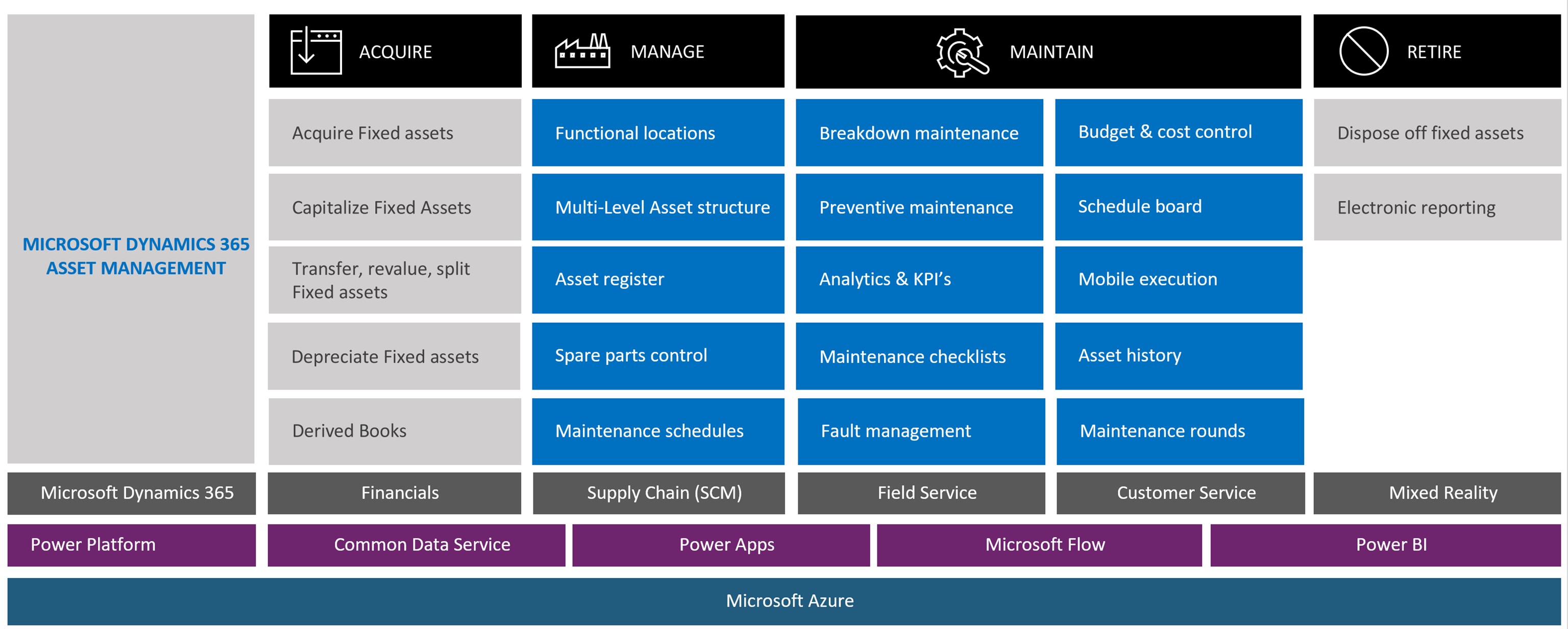
Whether you’re tracking heavy machinery, office equipment, or digital infrastructure, managing assets efficiently is essential to controlling costs and minimizing downtime. Microsoft Dynamics 365 Finance and Operations (D365FO) provides a modern, integrated solution for managing the full asset lifecycle—from acquisition to retirement.
Here’s how small and midsize businesses can configure D365FO to with precision and flexibility.
Start with Functional Location Hierarchies in Dynamics F&O
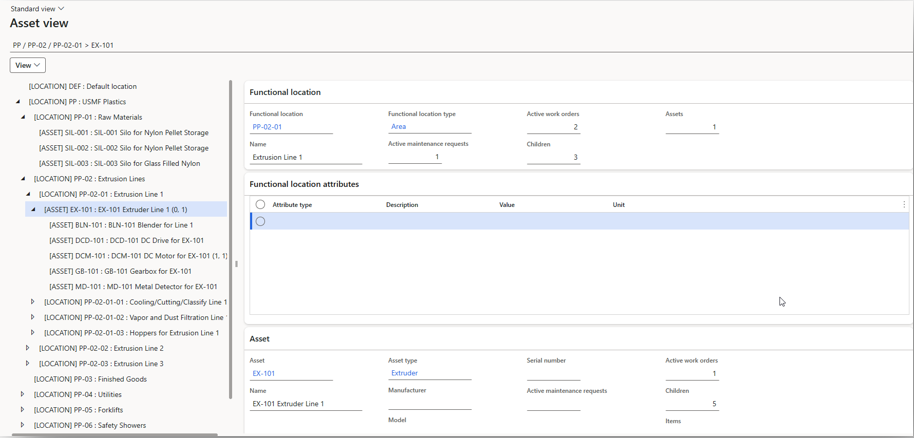
The first step toward organized asset management is understanding where assets live—physically or operationally. Dynamics 365 FO allows businesses to build functional location hierarchies, giving structure to asset placement and helping users visualize where each asset belongs.
A functional location might represent a plant floor, a department, a campus building, or even a specific zone within a warehouse. These hierarchies allow you to:
- Pinpoint the physical location of each asset
- Schedule and assign maintenance based on location-specific conditions
- Organize inspections or audits more efficiently
When you associate assets with functional locations, you gain better control over service history, usage metrics, and resource allocation. Teams can quickly locate equipment, understand its operational context, and make informed decisions about repair or replacement.
Leverage Built-In Functionality—and Customize as Needed
D365FO offers a broad range of out-of-the-box features designed to help businesses manage assets without needing excessive customization. These include:
- Asset registration and classification
- Depreciation methods and schedules
- Financial tracking tied to general ledger entries
- Fixed asset reports and analysis tools
However, D365FO’s real strength lies in its ability to adapt. If your organization has specific requirements—such as integration with IoT sensors, external maintenance vendors, or complex approval flows—you can extend the platform with custom configurations or third-party solutions. This balance between ready-made tools and extensibility means you won’t outgrow the system as your operations scale.
Configure Dynamics 365 F&O Workflows to Support Asset Lifecycle
Managing assets isn’t just about recording data—it’s about orchestrating processes. D365FO allows you to design and implement automated workflows that reflect your internal policies and operational best practices.
For example, you can build workflows for:
- Preventive maintenance schedules
- Maintenance requests and escalations
- Asset transfers between departments or locations
- Approval processes for asset retirement or disposal
These workflows ensure that every asset-related task follows a consistent path. You eliminate manual bottlenecks, reduce errors, and create a reliable trail of activity for compliance and audit purposes.
Workflows can also be tied to roles and responsibilities. This means your maintenance team sees only the tasks relevant to them, while finance or procurement teams get alerts for asset purchases, capital expenditure requests, or disposal actions.
Monitor Performance and Make Data-Driven Decisions
Once assets are configured and workflows are in place, you can use D365FO’s reporting and analytics tools to track performance over time. Built-in dashboards show you:
- Asset utilization rates
- Maintenance costs by department or location
- Total cost of ownership by asset class
- Upcoming maintenance events and overdue tasks
By monitoring this data regularly, your team can spot trends—such as which equipment is becoming a financial drain or which location has frequent repair delays. These insights help you make smarter decisions about asset investments and replacements.
Why It Matters
Effective asset management isn’t a luxury—it’s a competitive advantage. Businesses that track and maintain their assets well tend to avoid unnecessary downtime, reduce compliance risk, and improve their bottom line. Dynamics 365 FO provides the structure, tools, and flexibility to manage assets across their entire lifecycle, no matter the industry.
At , we help businesses set up and optimize asset management in D365FO to fit their unique operations. From building out your functional locations to designing automated workflows, our experts ensure you’re not just tracking assets—you’re maximizing their value.
Let’s talk about how D365FO can help you streamline asset management.
By Pharos Solutions