

Can a customer portal for manufacturing help solve for the operational and sales pressure the industry is facing right now?
There's no question manufacturers are under increasing pressure to modernize how customers, dealers, distributors, and sales teams place orders, request quotes, reorder products, track shipments, and access account information.
For many manufacturers, that pressure is exposing a larger issue: ERP systems were built to run operations — not modern customer buying experiences.
As a result, manufacturers are increasingly evaluating:
- Manufacturing customer ordering portals
- Dealer self-service portals
- ERP-connected commerce platforms
- Configure-to-quote tools
- Customer self-service experiences
But many customer portal projects fail because companies focus too heavily on the website itself instead of the operational workflows behind it.
The most successful manufacturing customer portals are not simply ecommerce storefronts.
They become the customer-facing operational layer connected directly to ERP.
In this guide, we’ll break down:
- How to build a customer portal for manufacturing
- What dealers and distributors actually need
- The best customer portal and self-service tools for manufacturers
- Common mistakes manufacturers make
- How to modernize customer experience without replacing ERP
Why Manufacturers Are Investing in Customer Portals
Manufacturing buying behavior has changed significantly.
Customers increasingly expect:
- Self-service ordering
- Real-time pricing
- Order visibility
- Faster quoting
- Reordering from history
- Mobile-friendly experiences
- Account visibility
- Faster response times
Dealers and distributors expect even more.
They often need:
- Customer-specific pricing
- Multi-user account access
- Quote requests
- Approval workflows
- Inventory visibility
- Bulk ordering
- Shipment tracking
- Invoice access
It comes down to what we call the
Many manufacturers still manage these workflows through:
- Emails
- PDFs
- Phone calls
- Spreadsheets
- Manual ERP entry
That creates operational friction, slower sales cycles, and customer service overload.
In our , we found more than one out three respondents plan to invest in manufacturing customer portals by 2027 to drive growth and reduce margin pressures.

What Is a Manufacturing Customer Ordering Portal?
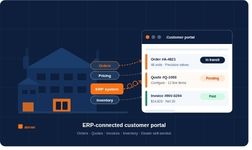
A manufacturing customer ordering portal is a self-service platform connected to ERP systems that allows customers, dealers, distributors, and sales teams to interact digitally with manufacturers.
Unlike basic ecommerce websites, manufacturing portals often support:
- Customer-specific pricing
- Dealer workflows
- Configure-to-quote
- Complex ordering
- Account management
- Order history
- Invoice visibility
- Reordering
- Sales-assisted buying
- ERP-connected inventory and pricing
The goal is not simply online ordering.
The goal is reducing friction across the entire quote-to-order-to-service lifecycle.
How to Build a Customer Portal for Manufacturing
Many manufacturers approach portal projects as purely IT or web development initiatives.
That is often where projects go wrong.
The best manufacturing customer portals are designed around operational workflows first.
Step 1: Start With Customer and Dealer Workflows
Before evaluating technology, manufacturers should map:
- How dealers place orders
- How quotes are requested
- How customer service interacts with buyers
- Where approvals happen
- How pricing is managed
- Where delays occur
The portal should simplify those workflows — not recreate existing inefficiencies digitally.
Step 2: Keep ERP as the System of Record
One of the biggest mistakes manufacturers make is creating disconnected portal experiences.
The best customer portals for manufacturers remain tightly connected to ERP systems for:
- Pricing
- Inventory
- Orders
- Customer records
- Account history
- Product information
This helps manufacturers avoid:
- Duplicate data
- Pricing inconsistencies
- Manual order entry
- Synchronization issues
- Operational complexity
Modern customer portals should extend ERP — not replace it.
Step 3: Support Dealers and Distributors Properly
Dealer and distributor workflows are often overlooked during portal projects.
But in many manufacturing industries, dealers are the primary buying channel.
A dealer portal should support:
- Customer-specific pricing
- Multi-location ordering
- Quote requests
- Role-based permissions
- Reordering
- Account visibility
- Bulk ordering
- Sales-assisted workflows
This is one reason many generic ecommerce platforms struggle in manufacturing environments.
Step 4: Support Configure-to-Quote Workflows
Many manufacturers sell configurable or made-to-order products.
That requires more than a simple shopping cart.
Manufacturing portals increasingly need:
- Guided configuration
- Configure-to-quote
- Approval workflows
- Sales-assisted quoting
- Product recommendations
- Complex pricing logic
This becomes especially important for manufacturers with dealer networks or configure-to-order products.
Step 5: Plan for AI and Self-Service Growth
Manufacturers are increasingly investing in AI-assisted selling and customer self-service.
Modern customer portals should support future capabilities like:
- AI-generated recommendations
- Frequently bought together suggestions
- Guided selling
- Personalized account experiences
- Intelligent search
- Automated service workflows
Manufacturers building portals today should evaluate long-term scalability — not just immediate requirements.
The Hidden Costs of Building Custom Customer Portals
Some manufacturers initially consider building custom portals internally.
While custom development may seem flexible upfront, many organizations underestimate:
- Ongoing maintenance
- ERP integration complexity
- Upgrade management
- Security requirements
- Duplicate business logic
- Technical debt
- Internal resource demands
Over time, disconnected or heavily customized portals often become difficult and expensive to maintain.
That is why many manufacturers now prioritize ERP-connected customer portal platforms instead of fully custom builds.
What Dealers Actually Want From Manufacturing Portals
Manufacturers often focus heavily on internal requirements during portal projects.
But dealer adoption depends on usability.
Dealers typically want:
- Faster ordering
- Accurate pricing
- Quick reorder capability
- Account visibility
- Quote history
- Shipment tracking
- Easy product discovery
- Mobile-friendly experiences
If the portal does not simplify dealer workflows, adoption suffers.
What Are the Best Customer Portal and Self-Service Tools for Manufacturers?
The best customer portal and self-service tools for manufacturers typically share several characteristics:
ERP Connectivity
The platform should connect directly to ERP systems while maintaining operational integrity.
Manufacturing Workflow Support
The system should support complex pricing, quoting, dealer workflows, and configure-to-order requirements.
Dealer and Customer Self-Service
The portal should reduce friction while supporting both self-service and sales-assisted experiences.
Scalability
The platform should support future AI, commerce, and service initiatives.
Faster Time-to-Value
Manufacturers increasingly prioritize solutions that can go live in weeks — not multi-quarter custom development projects.
Why ERP-Agnostic Portals Matter
Many manufacturers worry they must wait for ERP migrations or upgrades before modernizing customer experience.
In reality, many organizations are now prioritizing ERP-agnostic customer portals that can:
- Connect across ERP environments
- Support phased modernization
- Reduce operational risk
- Accelerate deployment
- Preserve ERP investments
That flexibility becomes especially important during:
- ERP upgrades
- Migrations
- acquisitions
- multi-ERP environments
- digital transformation initiatives
Microsoft Dynamics Users: What to Look for in a Customer Portal
Despite the strengths, there are also known gaps in the customer-facing commerce experience. For example:
- D365 doesn't ship with a native dealer or customer ordering portal
- Power Pages (the Microsoft portal tool) requires significant development effort and lacks manufacturing-specific workflows like CPQ, configure-to-quote, and customer-specific pricing
- Dataverse-based custom portals become expensive to maintain and upgrade
- Many D365 users are mid-migration from NAV or AX — portal decisions get caught in the transition
The Shift Toward Portal-First Manufacturing Commerce
Manufacturers are increasingly moving toward what many are calling portal-first commerce.
That includes:
- Customer self-service
- Dealer portals
- ERP-connected quoting
- Configure-to-quote
- AI-assisted selling
- Account-based buying experiences
- Reorder and service workflows
In many organizations, the customer portal is becoming the operational front-end for the entire customer experience.
Final Thoughts
The best manufacturing customer ordering portals do more than support online orders.
They help manufacturers:
- Modernize customer experience
- Reduce operational friction
- Improve dealer enablement
- Accelerate quote-to-order workflows
- Extend ERP investments
- Support self-service growth
- Prepare for AI-assisted commerce
The most successful manufacturers are not replacing ERP.
They are building customer-facing experiences around it.
Evaluating Customer Portal Strategies?
See how manufacturers are modernizing dealer portals, customer self-service, quoting, and ERP-connected commerce without replacing their ERP.
.
Want more? Learn about
FAQs
How do you build a customer portal for manufacturing?
Manufacturers should start by mapping customer and dealer workflows, then selecting an ERP-connected platform that supports quoting, ordering, self-service, and account management.
What is a manufacturing customer ordering portal?
A manufacturing customer ordering portal is a self-service platform connected to ERP systems that supports ordering, quoting, account visibility, and dealer workflows.
What are the best customer portal and self-service tools for manufacturers?
The best tools typically support ERP integration, dealer workflows, configure-to-quote, customer-specific pricing, and scalable self-service experiences.
Why do manufacturers need dealer portals?
Dealer portals help manufacturers improve ordering efficiency, pricing visibility, account management, and customer service while reducing manual workflows.
Do manufacturers need to replace ERP to modernize customer portals?
No. Many manufacturers modernize customer experience by implementing ERP-connected portals that extend existing ERP investments.
Can manufacturers using Microsoft Dynamics 365 use a third-party customer portal?
Yes. Manufacturers running Dynamics 365 Business Central, F&SCM, or legacy NAV/AX environments can implement ERP-connected customer portals that integrate directly with Dynamics without replacing or replatforming the ERP. This approach is faster and lower-risk than building a custom portal through Power Pages.