

Why nonprofits end up here in the first place
Most nonprofits land on Business Central for reasons that have nothing to do with reporting, even though nonprofit reporting in Business Central becomes one of the first real tests after go-live.
Some have been on Microsoft systems for years. Solomon, Great Plains, NAV. The move to Business Central feels like a continuation of that path instead of a reset. The data model is familiar. The ecosystem is familiar. The risk feels contained.
The Microsoft name makes the conversation with leadership easier. The system runs in the cloud. The subscription cost stays within reach for organizations that need to protect program spend. It fits into an environment where Excel is already the working layer for finance.
You can get up and running without fighting the system. Contributions post. Dimensions give you a way to organize funds and programs. You can close a period and trust the numbers.
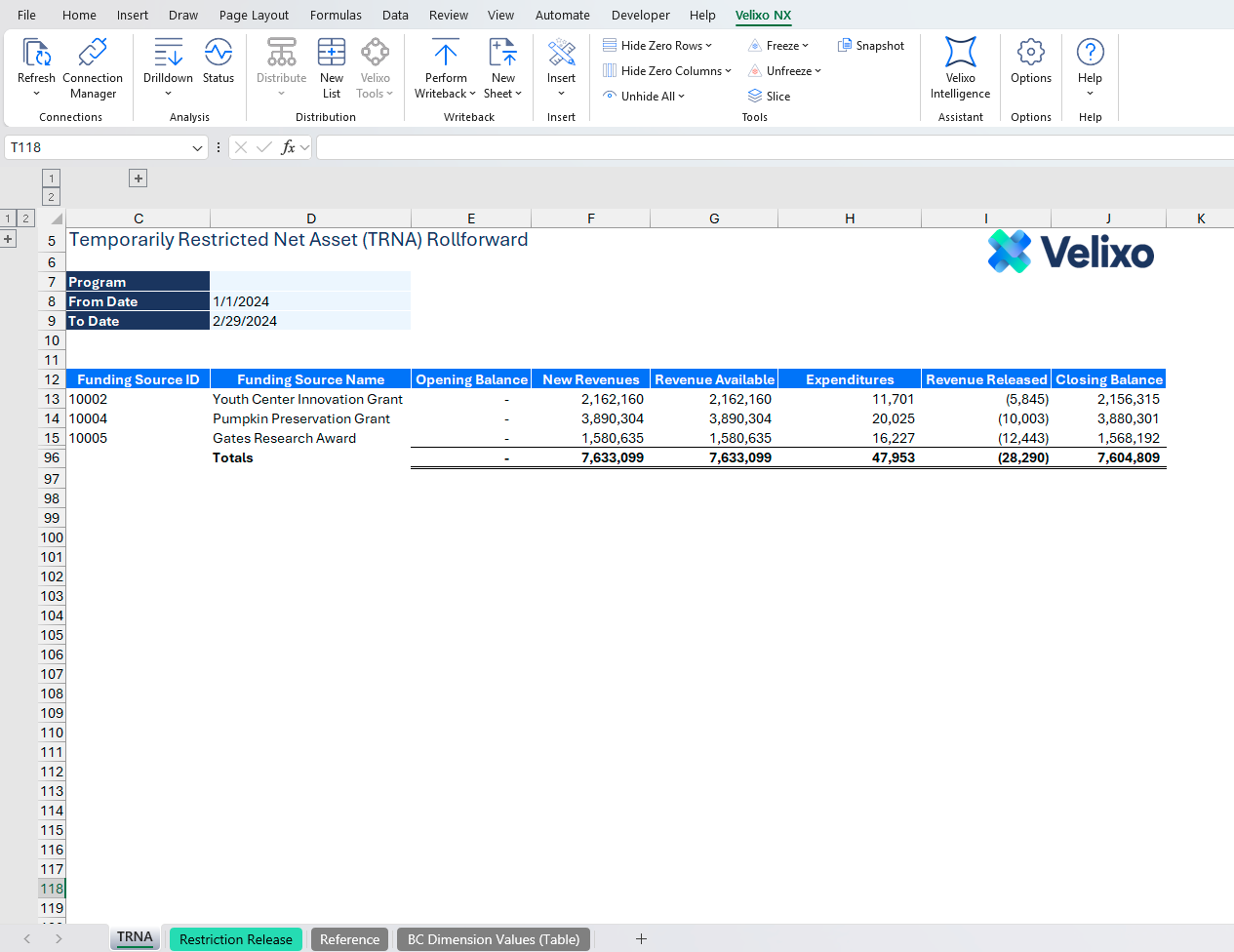
Then you sit down to build the TRNA rollforward. That is where nonprofit reporting in Business Central shifts from recording activity to explaining it. At that point, you are working through how to explain the movement of restricted net assets in a format that holds together across financial statements, footnotes, and audit.
Rather quickly, you realize that the built-in reporting tools at your disposal will make this challenging at best and impossible at worst.
The TRNA rollforward defines the problem
The TRNA rollforward is where everything converges, and it exposes something broader than just net asset tracking.
You're taking restricted balances and explaining how they moved. Beginning net assets tie to prior period financials. Contributions increase restricted balances based on donor intent. Releases reflect the point where those restrictions have been satisfied. Ending balances carry forward and need to agree back to the general ledger.
If this sounds simple, it's deceptive! Each donor restriction behaves differently. Some release with time. Some release with program spend. Some sit untouched until a specific condition is met. The categories change as new funding comes in. The layout of the rollforward needs to change with them.
Nonprofit finance does not operate inside fixed reporting structures. The requirements move with funding, programs, and restrictions. The TRNA rollforward makes that visible because it has to flex every period. The same dynamic carries through financial statement presentation under nonprofit accounting standards, functional expense allocations, grant reporting, and disclosure support.
The rollforward just happens to be a place where you cannot ignore it.
At the same time, the report needs to hold up outside the finance team. It feeds financial statements. It supports footnote disclosure. It becomes one of the first places an auditor will go to understand how restricted net assets are managed.
This is not a report you build once and leave alone. It moves every period.
Where nonprofit reporting in Business Central starts to break
The issue is not whether Business Central can hold the data needed for the TRNA rollforward. The balances are there. Contributions are recorded. Dimensions capture funds, programs, and restrictions in a structured way. You can trace activity at the transaction level without issue.
The breakdown happens when you try to shape that data into the rollforward.
You need to control the layout. You need to decide how restrictions are grouped. You need to present additions and releases in a format that aligns with how your organization explains its financials. You may have to adjust the way rows or columns are filtered. That structure changes as funding changes.
Inside the ERP, that level of control is limited. The report definitions expect stability and often lack the capacity to adjust dynamically to changes in your account or dimension structure. The TRNA rollforward does not fit well in this kind of "set it and forget it" model for reporting.
That is where nonprofit reporting in Business Central starts to rely on something outside the system.
So, as is often the case, the accounting and finance teams moves the work into Excel. This becomes the reporting layer where nonprofit finance actually operates
The reporting model needs to stay flexible period to period
As we explored above, the TRNA rollforward forces a level of flexibility that does not compress into predefined report structures. New grants come in with different restrictions. Existing funds release on timelines that do not line up cleanly with reporting periods. Program activity accelerates or slows, which changes how balances move.
The report needs to absorb that without breaking. You're adding new columns, reshaping groupings, and adjusting how funds are presented as those conditions change. At the same time, prior period structure still needs to hold for comparison and audit support.
This is where nonprofit reporting in Business Central depends on a model that can change without rebuilding the entire report each time.
The TRNA rollforward makes this requirement visible (if it wasn't obvious already), but the same requirement carries into every part of nonprofit reporting that depends on structure, not just data.
Nonprofit reporting in Business Central moves into Excel by design
Despite the best-intentioned attempts by many a CFO or software implementation consultant over the past several decades, the TRNA rollforward continues to live in Excel for most organizations.
That is where finance controls the layout, defines how restrictions are grouped, and builds the structure that supports financial statements and disclosure. The workbook becomes the place where the numbers are shaped into something usable. In a perfect world, this would be connected live to your Business Central environment so that every data update isn't a quasi-rebuild effort.
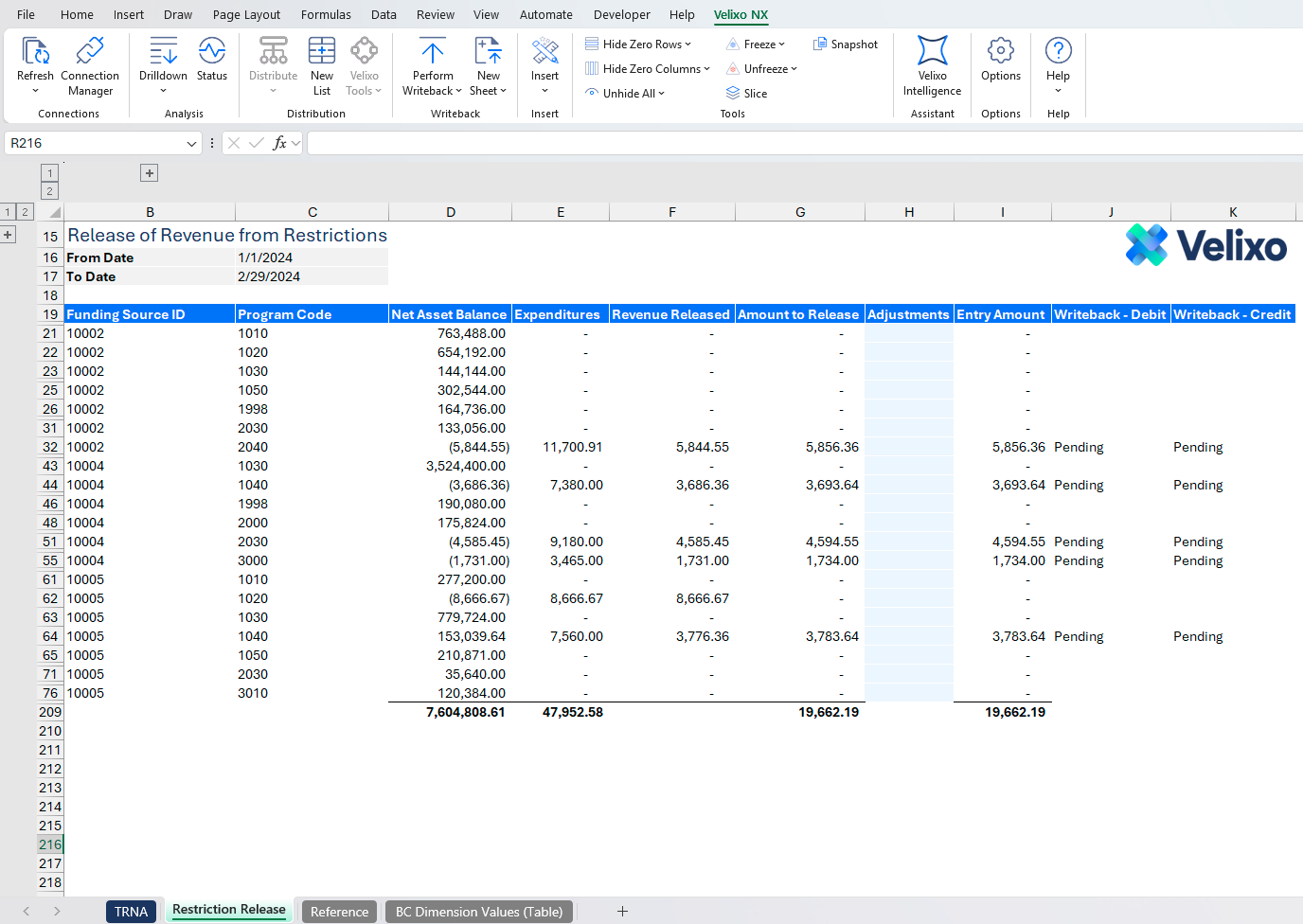
Velixo delivers exactly that. Balances, contributions, and activity flow into Excel with full dimensional detail. The rollforward updates against live data without relying on exports or manual refresh cycles. Each section of the report ties back to the underlying transactions in the system. Even better, when you need to release net assets from restriction, Velixo's journal entry writeback can send those postings back to Business Central from the very same workbook you're using to present your rollforward.
The structure stays in Excel because that is where it belongs. The data stays connected to Business Central so it remains consistent. That connection allows the TRNA rollforward to operate as part of the system instead of sitting beside it.
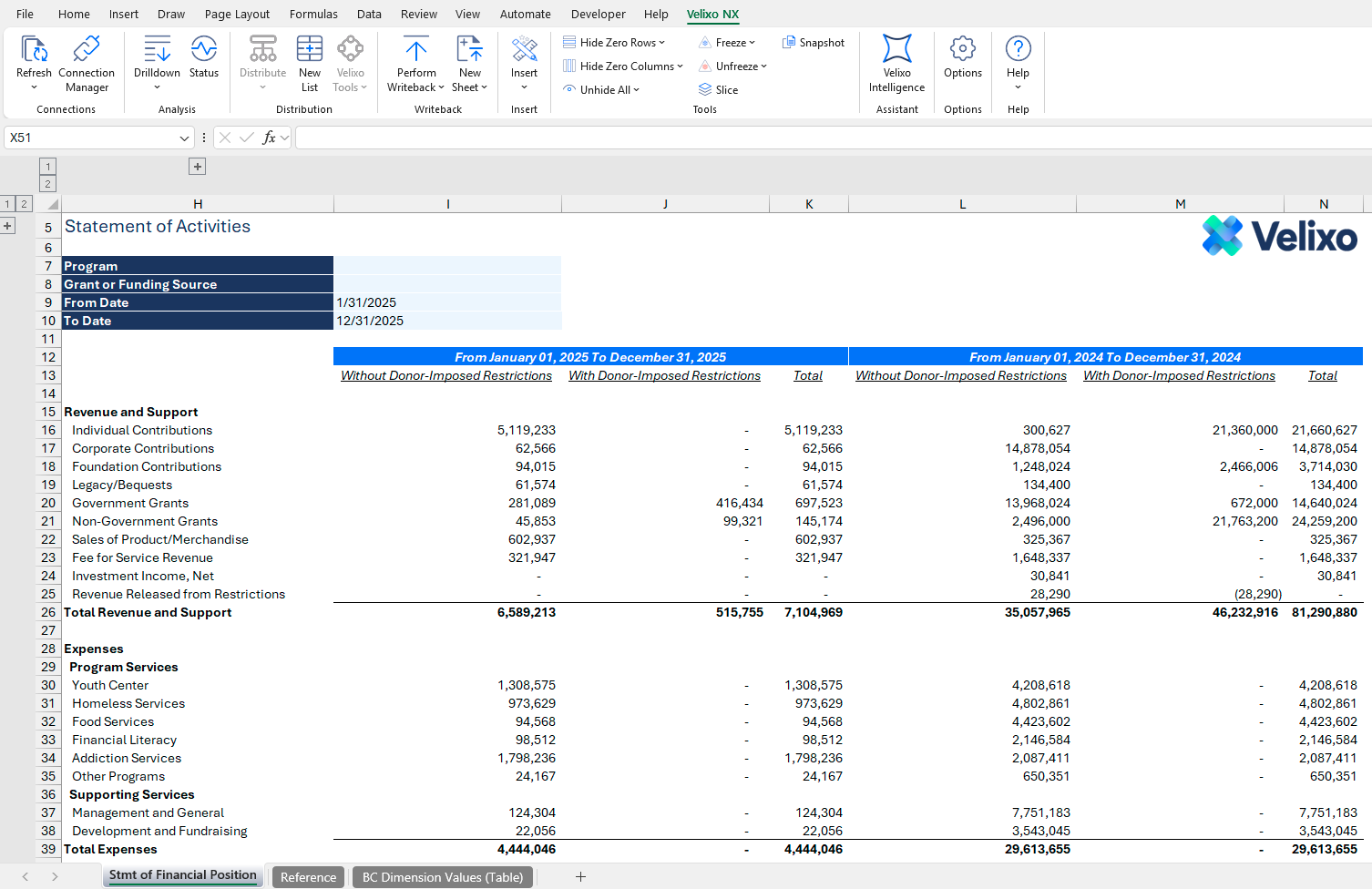
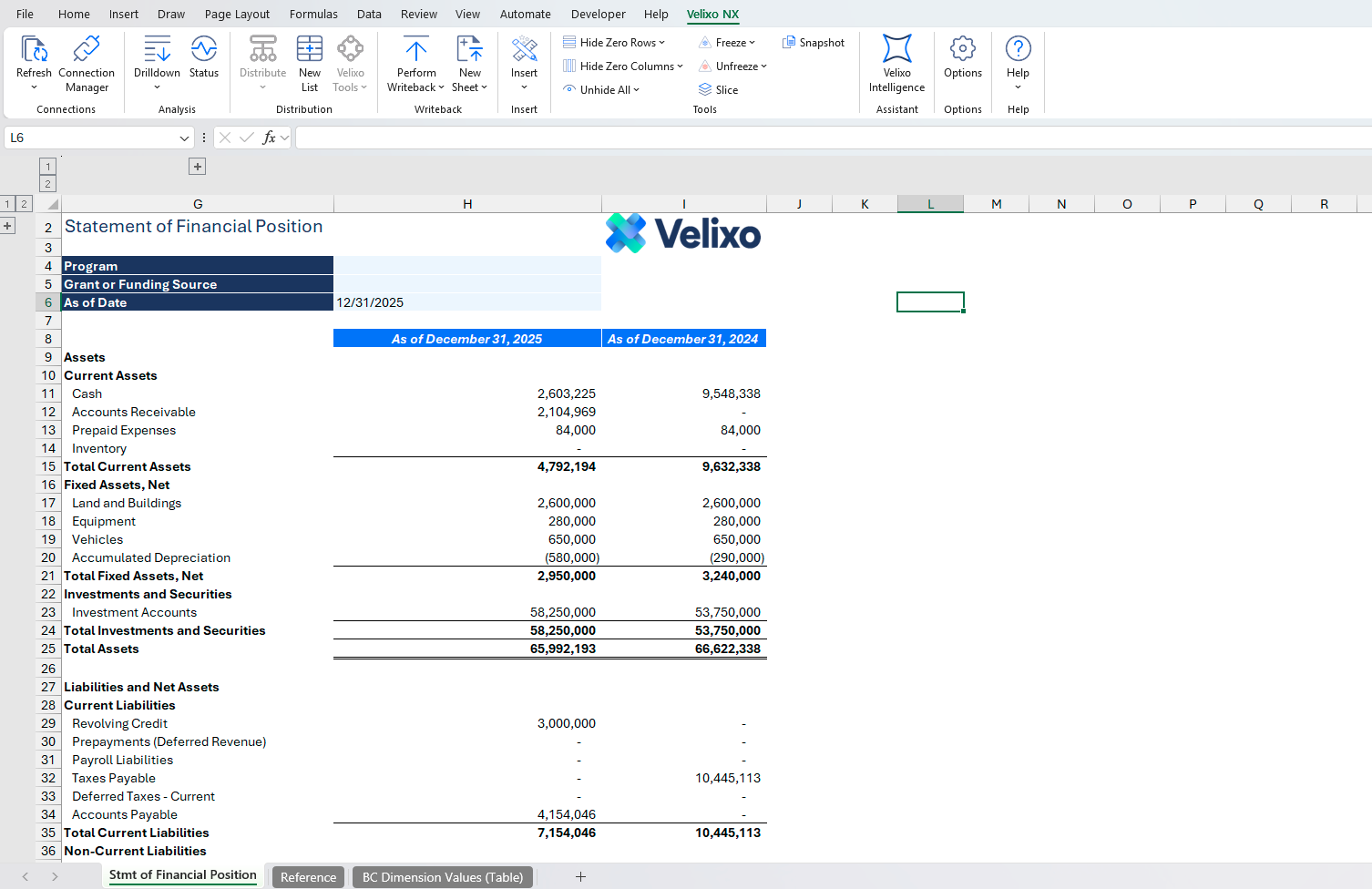
For example, in an alarmingly short amount of time, I was able to create everything in the below gallery and more with Velixo connected to my Business Central environment.

Turning the rollforward into part of the accounting process
Once the TRNA rollforward is connected to live data, the next step is to stop treating it as a reporting artifact.
The rollforward already contains the logic that determines how much should be released from restriction. You are identifying which funds have met their conditions and calculating the amounts that move into unrestricted net assets.
In most environments, that calculation lives in Excel, and then someone re-keys or uploads a journal entry into the ERP. That break is unnecessary.
With in place, the same workbook that produces the rollforward can generate and post the release entries directly into Business Central. The calculation stays visible. The support stays attached. The entry reflects exactly what was derived in the rollforward.
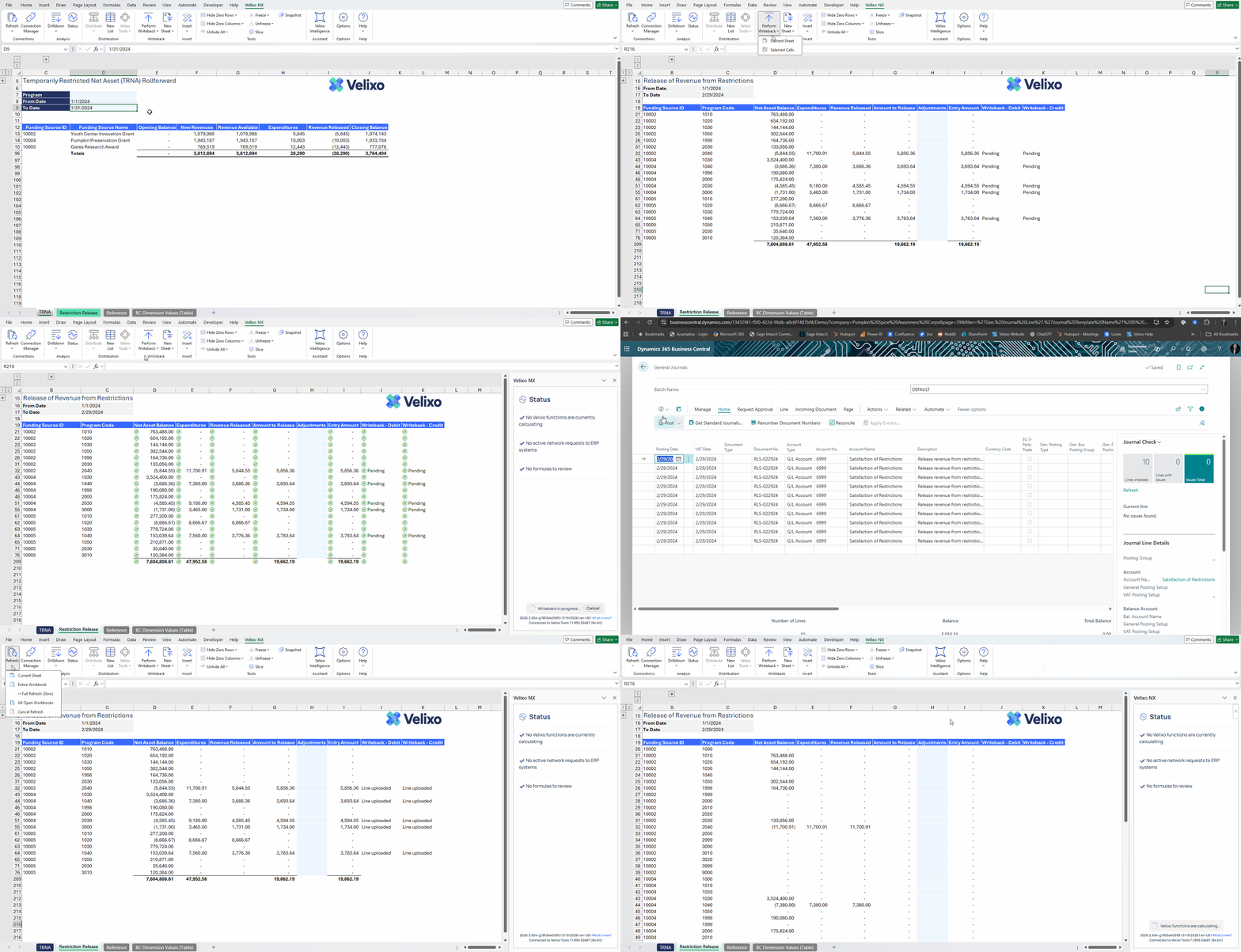
That changes how the process holds together. The report supports the financials, drives the accounting, and retains the detail needed for audit without moving across multiple disconnected steps.
If you're a nonprofit organization on Business Central, you might recognize the kinds of challenges covered here. What should you do? If your TRNA rollforward depends on exports, fix that first and connect it directly to Business Central.
