

Updated · Originally published
If your organization relies on Microsoft technologies, setting up the Partner Admin Link (PAL) is one of the easiest ways to get more value from your investment. Without a clear link between your business, Microsoft, and your trusted partners, you could miss out on key benefits, insights, and support.
That’s where Partner Admin Link (PAL) comes in. It ensures your partner—like Mekorma—is recognized for their contributions to your Microsoft environment, while you gain better visibility, optimization, and faster support.
What Is Partner Admin Link (PAL)?
Partner Admin Link (PAL) connects your partner’s Microsoft Partner Network (MPN) ID to the credentials they already use when working in your environment. Think of it as a digital name tag that lets Microsoft see which partner supports your Azure or Power Platform usage.
PAL doesn’t change permissions or expose sensitive data, it simply associates your partner’s existing access with their organization, giving Microsoft visibility into who’s helping you succeed.
How PAL Benefits Your Organization
Enabling PAL is a small step that leads to long-term business value. It keeps you, your partner, and Microsoft aligned to ensure your technology ecosystem performs at its best.
1. Smarter Optimization
With PAL enabled, your partner gains deeper insight into how your Azure and Power Platform resources are being used. This allows them to recommend improvements, reduce waste, and make sure every license and workload drives value.
2. Proactive Support
PAL helps your partner monitor adoption and resolve issues before they become roadblocks. Because Microsoft recognizes your partner as your official advisor, you also get faster access to the right resources when you need them.
3. Shared Accountability
PAL makes roles and responsibilities clear. Your partner is recognized for their contributions and incentivized to deliver measurable results that align with your goals.
4. Better ROI
By combining your partner’s expertise with Microsoft’s partner programs, PAL helps you accelerate adoption, improve efficiency, and maximize your cloud ROI.
Tip: If you work with more than one partner, PAL allows multiple partners to be recognized for the same engagement—reflecting the collaborative reality of modern business.
Setting Up Partner Admin Link (PAL)
Setting up PAL is quick—your IT team can complete the process in under five minutes.
Step 1: Assign Reader Access to Your Service Account
Before connecting Mekorma solutions to Azure, ensure your service account has the Reader role, which allows it to view resources securely without making changes.
For detailed instructions, see our .
Once the Reader role is set, you’re ready to link the account to Mekorma’s Partner ID.
Step 2: Link Your Products to Mekorma’s Partner ID
-
Sign in to the Azure portal.
-
Go to Link to a partner ID and sign in with your Power Apps service account (for example,
[email protected]or[email protected]). -
Enter Mekorma’s Microsoft Partner ID: 719878.
-
Click Link a partner ID.
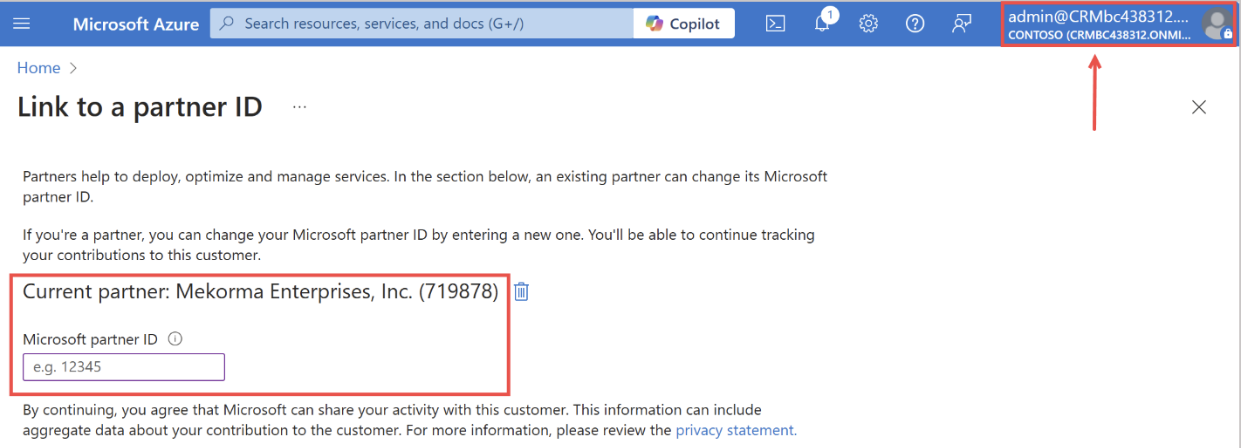
That’s it! PAL will now automatically recognize Mekorma’s contributions—as well as any other partners you’ve linked.
A Small Step with a Big Impact
Activating the Partner Admin Link might seem minor, but it plays a major role in how Microsoft identifies and supports your partner ecosystem.
By enabling PAL:
-
You gain enhanced service, insights, and optimization.
-
Microsoft recognizes and supports your partner relationships.
-
Your partner continues delivering value with full recognition and resources.
It’s a quick action that delivers lasting value for your business.
Need help setting up PAL? Contact us at [email protected].