

Updated · Originally published
Have you ever thought about how you could completely transform your sales strategies using AI? Imagine a scenario where your sales team isn’t just doing well but is truly unstoppable. This is the future with Microsoft Copilot for Sales, where AI-driven insights and automation are becoming essential tools.
In this blog, we’ll look at the exciting new features coming in the . Microsoft Copilot is about to change how sales teams work by offering innovative tools that increase productivity, improve customer engagement, and drive significant growth.
What can you expect? Let’s see how Microsoft Copilot is set to change the sales landscape with its cutting-edge capabilities. From advanced data analytics to seamless integration, this update will give your sales team a major competitive advantage.
Are you ready to maximize your sales operations' potential? Join us on this journey and discover the future of sales excellence.

What is Microsoft Copilot for Sales?
Microsoft Copilot for Sales is an AI-powered assistant designed to boost sales efficiency by integrating insights into everyday tools like Outlook, Teams, and Word. It connects seamlessly with Salesforce Sales Cloud and and can be configured for other sales platforms. Additionally, it includes licenses for Copilot for Microsoft 365 and Microsoft Copilot Studio, enhancing productivity and collaboration for sales teams.
Upcoming Microsoft Copilot for Sales Features:
- Cross-app experiences: Automatically suggest CRM updates, detect sales pipeline issues, generate stakeholder profiles, and provide sales coaching opportunities.
- Extensible experiences: Integrate partner applications seamlessly and extend Copilot functionalities using Microsoft Copilot Studio.
- Microsoft Outlook experiences: Integrate Copilot with email drafts and summaries, save attachments, and enhance mobile experiences.
- Microsoft Teams experiences: View sales information during meetings, share CRM records, and access real-time data.
Cross-app experiences
Suggest Updates to CRM Opportunity: Microsoft Copilot for Sales leverages AI to recommend updates to CRM opportunity records based on interactions like emails and meetings. It suggests changes to the opportunity's stage, close date, and estimated revenue, ensuring CRM data remains current and accurate. These updates can be applied directly from Outlook, Teams, or Copilot Chat, streamlining opportunity management and improving sales efficiency and forecasting accuracy.
Detect Customer Asks and Suggest Responses: Copilot can automatically detect customer requests from emails or conversations and suggest appropriate responses, saving time and ensuring consistency. This feature enhances customer engagement by providing timely and accurate replies, thereby improving customer satisfaction.
Highlight Key Insights About Situation and Deal: Copilot can highlight crucial insights about a deal or situation from various data sources, helping sales teams make informed decisions. By surfacing relevant information, it allows sales professionals to focus on strategic actions that can drive deal success.
Generate Profiles of Key Stakeholders: Microsoft Copilot can create detailed profiles of key stakeholders by pulling relevant information from CRM and external data sources. This feature helps sales teams understand their stakeholders better, improving engagement and strategy.
Extract Customer Information and Understand Deal Context: Copilot extracts critical customer information from various interactions, helping sales teams understand the context and dynamics of their deals. This ensures more personalized and effective communication.
Analyze Aggregated Sales Activities: Copilot analyzes sales activities to provide insights into trends and patterns. This helps sales teams identify successful strategies and areas needing improvement.
Integrate Copilot for Sales with Copilot in Word: Sales teams can use Copilot in Word to generate comprehensive meeting preparation documents, including participant information, opportunity summaries, and key insights. This integration ensures that all necessary data is available for productive meetings.
Get Copilot for Sales Extension in Teams Copilot Chat: This feature allows users to access authoritative answers to sales-related questions directly within Microsoft Teams. By integrating Copilot for Sales as an extension in Teams, sales professionals can easily obtain insights and data on sales KPIs, opportunity summaries, account summaries, meeting preparation reports, and competitor analysis. This integration enhances productivity by providing essential information within the Teams environment.
Extend Copilot for Sales: This feature enables customization and extension of Copilot for Sales through partner applications and Copilot Studio. It allows organizations to tailor the Copilot experience to their specific needs, integrating additional functionalities and ensuring a seamless fit with existing processes.
Get Sales Data Insights in Copilot Chat: Copilot provides detailed sales data insights directly within the chat interface. This includes critical metrics like win rates, sales cycles, and conversion rates, helping sales teams make informed decisions quickly and effectively.
View Key Sales Information: This feature allows sales professionals to access key sales information in real-time during meetings and interactions. It ensures that relevant data is always at hand, facilitating better decision-making and more effective sales conversations.
Leverage Manager Dashboards to Coach Sellers: Manager dashboards provide comprehensive insights into sales activities, allowing managers to coach their teams more effectively. These dashboards offer a detailed view of performance metrics, helping managers identify strengths and areas for improvement.
Analyze Sales Engagement: This feature analyzes aggregated sales activities to highlight engagement patterns and trends. It helps sales teams understand what strategies are working and where adjustments may be needed to improve overall performance.
Extensible Experiences
Sign in to Partner Applications from Copilot for Sales Easily: This feature streamlines the process of signing into partner applications, making it easier for sales teams to access and utilize data from partner solutions directly within Copilot for Sales. Users will see prompts within their Outlook experience, allowing for quick and efficient integration of partner data.
Use Copilot Studio to Extend Copilot for Sales: Copilot Studio enables customization of Copilot for Sales, allowing organizations to add or modify functionalities to better suit their specific needs. This includes integrating third-party applications and creating bespoke solutions that enhance the Copilot experience.
Enable Partner Application Integrations with Copilot for Sales: This feature allows for seamless integration of partner applications within Copilot for Sales. It ensures that data and insights from these applications are readily accessible, improving the overall utility and effectiveness of Copilot.
Microsoft Outlook experiences
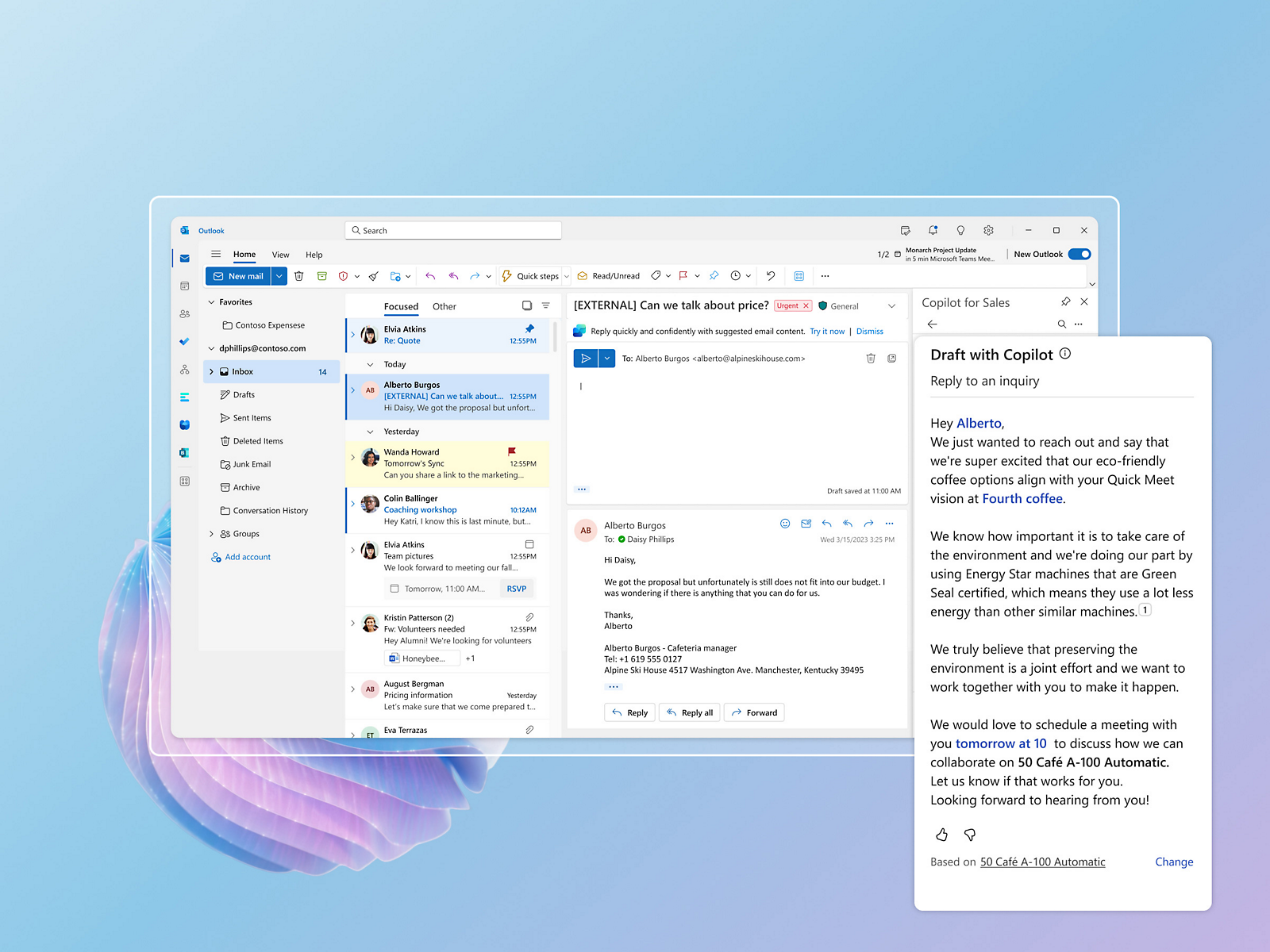
Integrate Copilot for Sales with Outlook Email Drafts: This feature integrates Copilot into Outlook to provide dynamic, context-aware email replies. It enhances sales productivity by detecting sales situations and suggesting responses that help advance deals. This integration ensures more targeted and effective communication, ultimately increasing the likelihood of closing deals and driving revenue growth.
Integrate Copilot for Sales with Outlook Email Summaries: Copilot generates summaries of email conversations, highlighting key points and actions needed. This helps sales professionals stay on top of their communications and ensures nothing important is missed, making follow-ups more efficient and effective.
Automatically Save Email Attachments when Saving Emails to CRM: Copilot can automatically save email attachments to CRM when saving emails, ensuring that all relevant documents are stored in one place. This feature streamlines the process of managing sales-related documents and helps maintain organized records.
Track Additional Fields as Part of Saving Outlook Emails or Events to CRM: This feature allows sales teams to track additional fields when saving Outlook emails or events to CRM. It enhances data capture and ensures that all necessary information is recorded, supporting better decision-making and record-keeping.
Enhance Seller Productivity through Quick CRM Actions in Outlook Emails: Copilot offers quick CRM actions directly within Outlook emails, allowing sales professionals to perform tasks like updating records or adding notes without leaving their email client. This feature boosts productivity by reducing the need to switch between applications.
Microsoft Teams experiences
Integrate Copilot for Sales with Teams Chat Experience: Copilot for Sales integrates with Teams to provide real-time assistance during meetings. It offers features like brand analysis and opportunity summaries, allowing sales teams to access critical insights and data on the fly, which helps them stay informed and make quick decisions without distractions.
Access Real-Time Data During Meetings with Copilot for Sales Side Panel in Teams: This feature allows users to view and interact with key sales information during Teams meetings through a dedicated side panel. It provides up-to-date data on deals, contacts, and follow-ups, enhancing the effectiveness of sales meetings.
Collaborate with Sales Team in Teams Group Chats: Sales teams can use group chats within Teams to collaborate effectively. This feature ensures that all team members have access to the same information and can work together seamlessly on deals and strategies.
Show AI-Generated Entity Summaries When Sharing CRM Records in Teams: When CRM records are shared in Teams, Copilot can generate and display summaries of these entities, providing quick insights and context. This feature helps team members understand the shared data quickly and make informed decisions.
Collaborate with Sales Teams Using AI-Powered Planner Tasks: Copilot for Sales automates the creation of tasks within Teams channels by scanning conversations for action items and prompting users to create tasks. This fe
Receive Pre-Meeting Tips: Copilot provides pre-meeting tips to help sales professionals prepare effectively. These tips include insights on participants, previous interactions, and suggested talking points, ensuring more productive and informed meetings.
Add Tags to Meetings to Be Able to Easily Search Them: This feature allows users to tag meetings, making it easier to search and retrieve relevant meeting information. It helps in organizing and managing meetings more effectively.
Support Sellers with Copilot for Sales Mobile Experiences in Teams: Copilot extends its functionalities to mobile experiences, allowing sales professionals to access critical information and perform tasks on the go. This feature ensures that sales teams remain productive and informed, regardless of their location.
Conclusion
Microsoft Copilot for Sales is transforming the sales landscape with its AI-driven insights, cross-app experiences, extensible integrations, and seamless functionalities across Outlook and Teams. These features boost productivity, enhance customer engagement, and drive significant growth for sales teams.
is an expert in . With a proven track record of seamless integrations and maximizing business potential, Dynamics Square is your trusted partner for transforming your sales strategies with Microsoft Copilot for Sales.