

|
Rapidi Data Integration Solution for Dynamics 365 BCData Integration Solution for Dynamics 365 Business Central ERP & Salesforce CRM |
Product Verticals: All Industries
Business Processes: AP Automation, Business Process Management, Data Integration, Data Management, Data Migration, Financial Management, Inventory Management, Manufacturing, Master Data Mgmt, Order Management, Payment Processing, Retail POS, Sales and Marketing, Sales Quoting
No-code, real-time data integration between Microsoft Dynamics 365 Business Central ERP and CRM systems, such as Salesforce, HubSpot, and Dynamics 365 Sales CRM
ERP Systems: Dynamics 365 Business Central (Essentials, Premium, Team Members), Dynamics NAV (all versions)
CRM Systems: Salesforce (all editions, including Professional, Enterprise, Unlimited), HubSpot
Product Verticals: All Industries
Business Processes: Financial Management, Sales Order Processing, Quote-to-Cash, Customer Management, Accounts Receivable, Invoice Processing, Supply Chain Integration, Contact Management
Rapidi delivers a secure, fast, and reliable integration between Salesforce CRM and Microsoft Dynamics 365 Business Central. The cloud-based iPaaS platform connects your sales and financial systems, eliminating data silos and giving teams access to accurate, synchronized information.
Built for Dynamics 365 Business Central deployments of all sizes, Rapidi handles the technical complexity of Business Central integration without requiring custom code or modifications to your ERP. Pre-built templates and ready-made transfer configurations let you start syncing data in days, not months.
Ready for All Business Central Editions: Rapidi supports Dynamics 365 Business Central Essentials, Premium, and Team Members editions. All core/standard and custom entities sync with Salesforce without additional development on your end. Rapidi also supports Azure-based installations, Microsoft Online deployments, and local installations.
Pre-Built Integration Features
- Customer/Account Synchronization: Bidirectional sync maintains consistent customer master data across Salesforce and Business Central. Customer records created or updated in either system are reflected in the other automatically.
- Contact Management: Bidirectional contact data transfer between systems makes sure invoices and communications reach the right people. Person contacts associated with integrated customers/accounts stay in sync.
- Product and Pricing Data: Items from Business Central sync to Products in Salesforce. Unit prices transfer to the Standard Price Book, and sales prices by currency, item, quantity, or sales code transfer to additional Price Books.
- Quote-to-Order Automation: When opportunities close in Salesforce, they instantly create sales orders in Business Central without manual re-entry. Quotes generated in Salesforce synchronize to new open sales orders and process further when the opportunity is won.
- Invoice Synchronization: Posted invoices and credit memos from Business Central transfer to Salesforce through the free SalesHistory3 App Extension, giving sales reps full visibility into billing status.
- Payment History: Customer ledger entries and payment information are visible in Salesforce for informed customer conversations.
- Sales Order Status: Open sales orders from Business Central sync back to Salesforce through an add-on to the SalesHistory3 application. Sales teams see order fulfillment progress without switching systems.
Salesforce Certified Integration: Rapidi is Salesforce AppExchange certified. This certification allows integration with Salesforce Professional Edition without purchasing separate Salesforce API access.
Key Benefits
- Faster Financial Operations: Automate data synchronization between Salesforce and Business Central to reduce manual entry and errors.
- Improved Data Accuracy: Consistent, accurate financial data across your organization.
- Better Sales Visibility: Sales teams access financial data (credit status, payment history, outstanding invoices) without leaving Salesforce.
- Faster Quote-to-Cash: Speed up the sales cycle with automated order creation and real-time visibility.
- Reduced IT Overhead: A no-code platform that requires no custom development or ongoing IT maintenance.
- ERP Component for Salesforce: Rapidi provides a free Salesforce App Extension that pushes financial data, sales history, order updates, and payment history into Salesforce.
Technical Capabilities
- Integration Methods: OData, REST API, SOAP, ODBC, and direct database access (on-premise or Azure)
- API Pages Support: Full support for Business Central's API Pages (v2.0), prepared for Microsoft's deprecation of OData UI page endpoints by 2027 Wave 1
- Real-Time and Scheduled Sync: Configure transfers to run in real-time, on schedule, or triggered by workflow events
- Bidirectional Data Flow: Data flows in either direction between Business Central and Salesforce
- All Entities Supported: Integrate any Business Central entity (standard or custom) with Salesforce
- LinkStorage: Cross-reference IDs stored within Rapidi. No custom fields required in source systems.
- Built-in Scheduler: Set up transfers to run whenever you want, including automatic, manual, and triggered transfers
- SSL Encryption: All data transfers are compressed and encrypted using TLS 1.2/1.3
- AI-Assisted Monitoring: Albert, Rapidi's AI assistant, monitors transfers, alerts you before small issues become large problems, and translates error messages into plain language
Supported Versions
- Microsoft Dynamics 365 Business Central Essentials
- Microsoft Dynamics 365 Business Central Premium
- Microsoft Dynamics 365 Business Central Team Members
- Microsoft Dynamics NAV (all versions)
- Salesforce Professional, Enterprise, and Unlimited editions
- Salesforce Classic and Lightning Experience
- HubSpot CRM
"We are using Rapidi for our Global integration between SalesForce and MS Dynamics Business Central with 3 Regional Instances and 10+ Operating Company's. Rapidi is a joy to work with; Good support, easy to implement and easy to maintain. Best Value for Money in the market!"
Jeroen Weijts, Senior Operations Manager, Movella Technologies B.V.
"Rapidi is very flexible and covers data integration to many different systems, but is especially strong when integrating to the Microsoft Dynamics Product Suite."
Morten Gad, Technical Consultant at C2
Why Choose Rapidi for Business Central Integration?
- Business Central Expertise: Deep experience with all Business Central editions, including multi-company and multi-regional configurations.
- 30+ Years Experience: Rapidi has specialized in Microsoft Dynamics integrations since 1992.
- Salesforce AppExchange Certified: Lightning Ready certification is compatible with all Salesforce features.
- Pre-Built Templates: Proven integration patterns refined across hundreds of implementations.
- No-Code Platform: Business users configure and manage integrations without developer involvement.
- 97% Customer Satisfaction: Hundreds of 5-star ratings on Salesforce AppExchange.
- Support Included: Subscription includes ongoing support, maintenance, and platform updates.
- Transparent Pricing: Flexible subscription model with no hidden fees.
Implementation Timeline
- Discovery and Planning: 1-2 days
- Configuration: 2-3 days
- Testing: 2-3 days
- Go-Live: 1 day
Typical total implementation time: 1-2 weeks for standard integrations. Complex implementations with custom entities and multi-company requirements take 4-8 weeks.
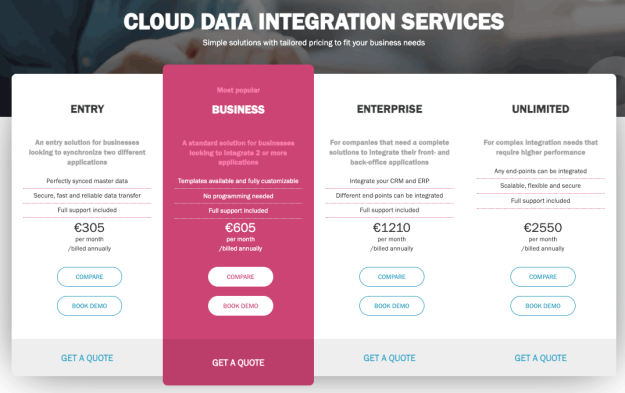
Pricing: Rapidi operates on a subscription model. Basic pricing starts at €285 per month. All plans include support, maintenance, and platform updates. Contact Rapidi for a customized quote based on your Business Central integration requirements.
Frequently Asked Questions
What integration technologies and methods does Rapidi offer?
The Rapidi Platform supports the most common integration technologies, including web services, OData, REST, SOAP, ODBC, and more. Rapidi offers prebuilt templates ready to use for integrations with Salesforce, Microsoft Dynamics 365 Business Central, HubSpot, NetSuite, and more. Preconfigured templates let you jump-start your integration project and adapt it to your specific needs. Custom integrations are also available. Contact Rapidi for a discovery call.
How long does it take to implement an integration with Rapidi?
Implementation time ranges from a single day to several weeks, depending on complexity. Standard integrations typically complete in 1-2 weeks. Custom integrations take longer and are more complex compared to standard setups.
What Business Central editions does Rapidi support?
Rapidi supports Dynamics 365 Business Central Essentials, Premium, and Team Members editions. It also supports all versions of Microsoft Dynamics NAV, Azure-based installations, Microsoft Online deployments, and local installations. The RapidiConnector is not required if Rapidi connects directly to your OData system.
How do I choose the best Salesforce and Dynamics 365 Business Central integration solution?
Prioritize ease of use, security, and flexibility. Look for a platform that provides real-time data synchronization between systems without manual intervention. Fast implementation and a user-friendly interface are also important for smooth adoption. Make sure the solution offers strong security measures to protect sensitive customer and financial data.