

|
CRM Insights for Dynamics 365 BCPower BI CRM Reporting for Dynamics 365 BC |
Product Verticals: All Industries
Business Processes: Business Intelligence, Customer Relationship Management, Reporting, Sales and Marketing
CRM Insights gives Microsoft Dynamics 365 Business Central users 15+ ready-to-use Power BI reports. In addition, it helps sales and marketing teams understand customer engagement, opportunities, campaigns, and pipeline performance.
 |
 |
Power BI CRM Reporting for Business Central
In addition, bring contact, interaction, opportunity, and marketing information into one reporting experience. Teams can follow customer relationships, monitor sales activity, and identify opportunities that may be slowing down.
What You Can Analyze
Gain a clearer view of customer relationships, sales opportunities and marketing activity. The app includes more than 100 measures and over 20 dimensions, allowing users to analyze results by salesperson, contact, campaign, segment, opportunity, company and other business dimensions.
- Contact Overview and profile questionnaire analysis
- Customer interactions and engagement activity
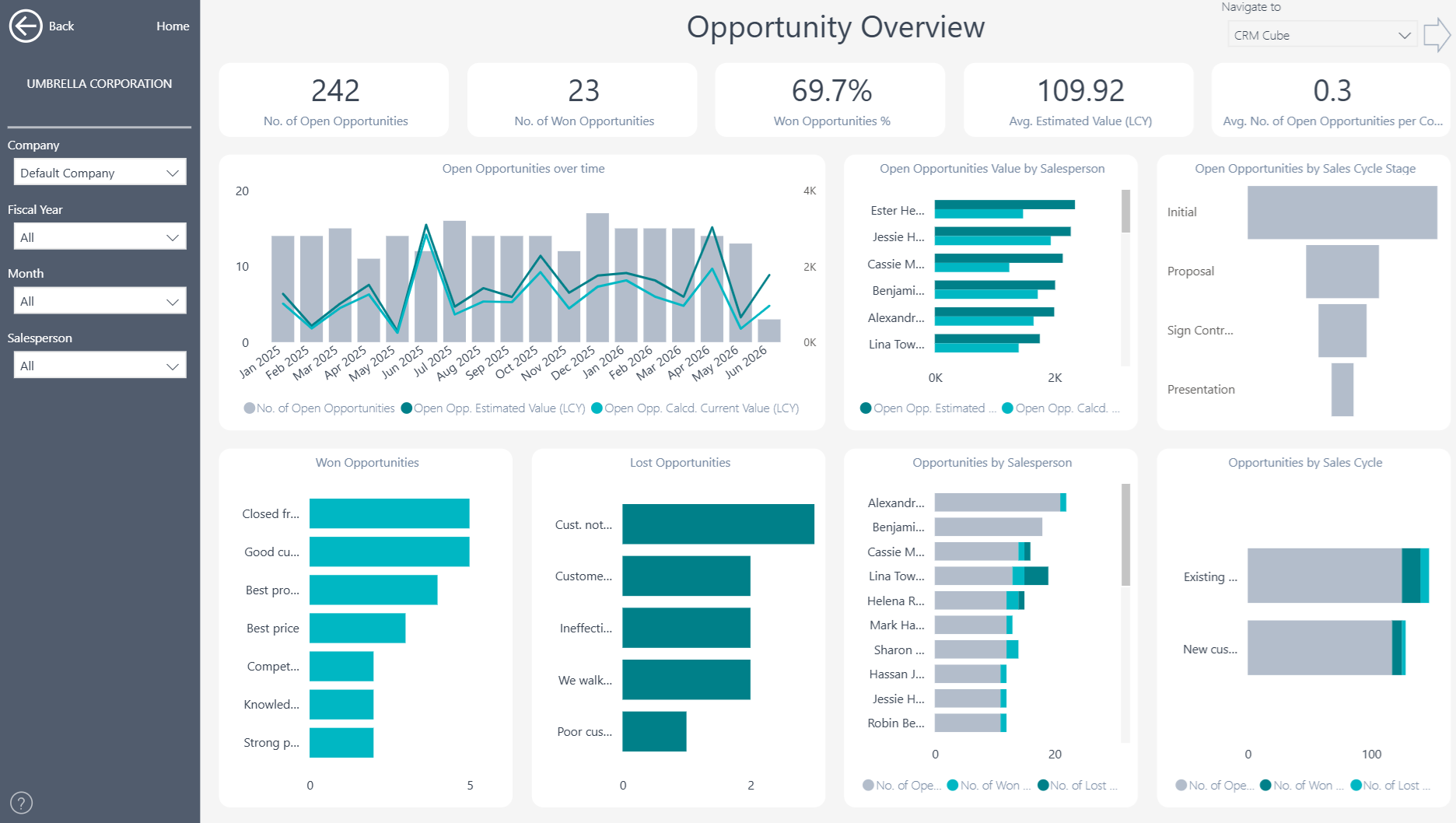
- Opportunity Overview and opportunity aging
- Sales pipeline value and performance
- Campaign and segment analysis
- Transaction-level drill-through and decomposition analysis
Strengthen Relationships and Improve Pipeline Visibility
Understand how relationships and opportunities develop over time. Sales leaders can then focus on stalled opportunities, compare salesperson activity and identify which campaigns or segments generate the most engagement.
Multi-Company and Flexible Analysis
Bring information from multiple Business Central companies into one reporting view. Then filter and compare results by company, date, location, product, supplier, customer, and other relevant dimensions.
Reporting Without Custom Development
The ready-to-use Power BI app connects directly to Microsoft Dynamics 365 Business Central, so teams can start with proven reports instead of building every dashboard from scratch. They can also use the underlying semantic model to create additional Power BI reports or analyze trusted Business Central data in Microsoft Excel.
Improve Opportunity and Pipeline Management
Sales leaders can compare opportunity value, stage, age, salesperson, and expected progress. For example, they can identify stalled opportunities and focus attention on deals that may need follow-up. In addition, contact and interaction reports show how teams engage with customers and prospects. Managers can compare activity with pipeline outcomes. Therefore, they can understand whether relationship-building efforts support commercial progress.
Connect Campaigns, Segments, and Sales Activity
Campaign and segment analysis helps marketing and sales teams review engagement across different audiences. Meanwhile, profile questionnaires provide more context about contacts and their needs. Users can move from headline pipeline measures to individual opportunities and interactions. As a result, teams gain a consistent view of relationship activity, sales opportunities, and potential revenue across Business Central companies.
Explore CRM Insights
Learn more about , review current , or book a tailored .
Ready to explore your own Business Central CRM data? Start a .
Submit your review | |