

|
Warehouse Insights for Dynamics 365 BCPower BI Warehouse Reporting for Dynamics 365 BC |
Product Verticals: All Industries
Business Processes: Business Intelligence, Inventory Management, Reporting, Warehouse Management
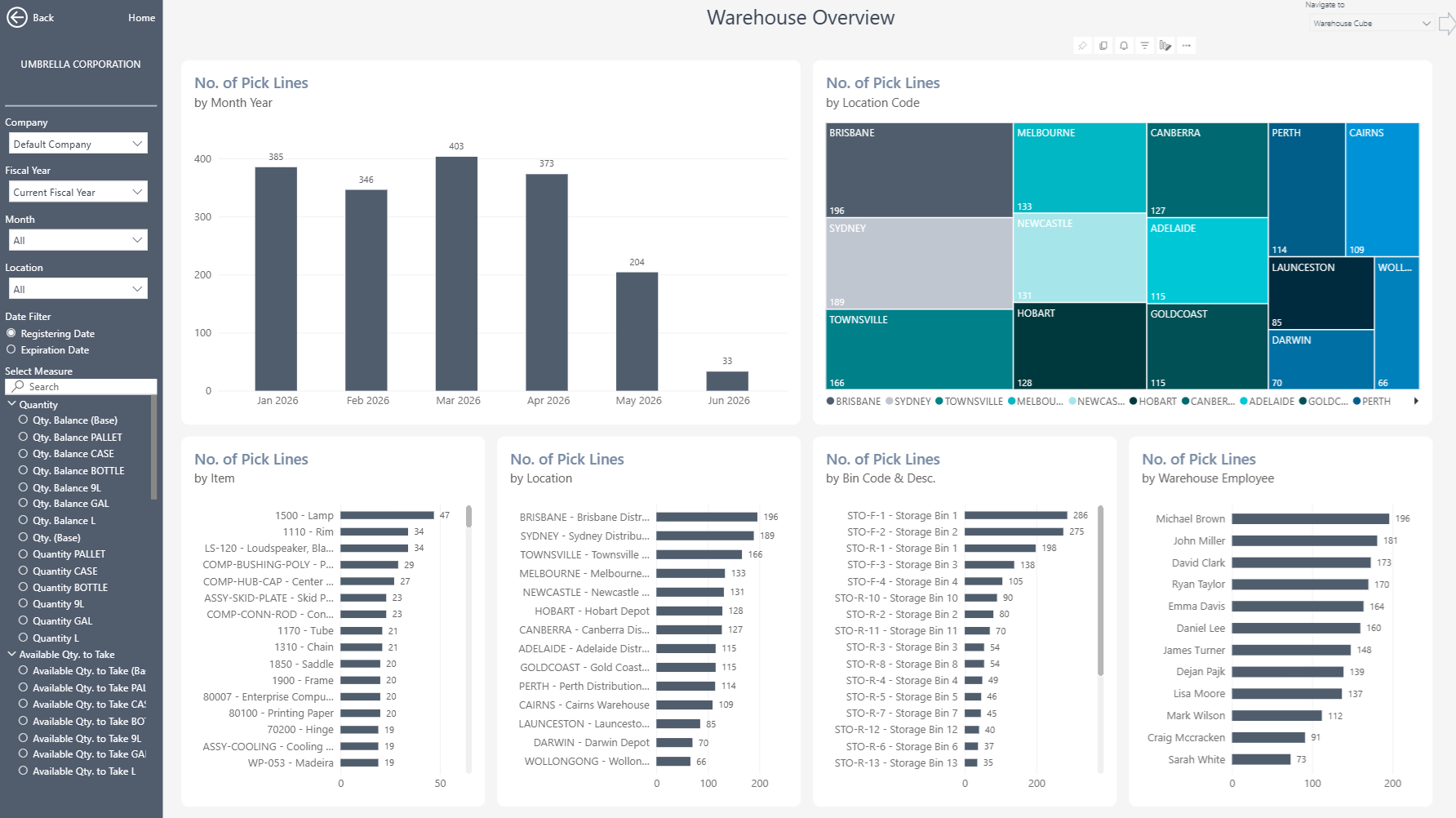
Warehouse Insights gives Microsoft Dynamics 365 Business Central users 10+ ready-to-use Power BI reports. In addition, it turns warehouse entries and bin content into practical information about activity, capacity, replenishment, and inventory movement.
 |
 |
Power BI Warehouse Reporting for Business Central
Give warehouse managers a clear view of inventory movements, stock locations and operational priorities. The app supports Business Central locations ranging from basic picks and put-aways to directed warehouse management setups.
What You Can Analyze
Evaluate warehouse activity across locations, zones, bins, items and periods. Users can move from headline measures to warehouse entries and bin-level detail when further investigation is needed.
- Warehouse overview and activity analysis
- Warehouse entries and inventory movements
- Item velocity and warehouse comparisons
- Capacity utilization by location, zone or bin
- Bin replenishment status and quantities to move
- ABC item analysis and slotting decisions
- Warehouse, inventory and implicit picks and put-aways
Improve Daily Warehouse Control
Compare activity, throughput, occupancy and capacity across locations, zones and bins. For example, managers can identify busy areas, underused space and movement patterns that may affect productivity. Warehouse comparison reports also highlight differences between locations or operating periods. This gives teams consistent information for daily reviews, workload planning and operational decisions.
Improve Replenishment and Stock Availability
Identify empty or understocked pick bins before they interrupt warehouse operations. Bin-replenishment analysis compares stock with minimum and maximum quantities and shows how much inventory teams need to move. As a result, warehouse teams can prioritize replenishment activity and keep picking locations supplied. They can also investigate the items, bins and movements behind each result.
Support Better Slotting and Movement Decisions
Velocity and ABC analysis show which items move most frequently. As a result, teams can use this information to review slotting decisions and place high-activity items in more suitable locations. Users can then trace summary measures to warehouse entries and bin content. This helps operational teams investigate movements, improve warehouse layouts and use available capacity more effectively.
Multi-Company and Flexible Analysis
Bring warehouse information from multiple Business Central companies into one reporting view. Users can then filter and compare results by company, date, location, zone, bin, item and other relevant dimensions. At the same time, the consolidated view preserves access to individual locations, bins and source entries.
Reporting Without Custom Development
The ready-to-use Power BI app connects directly to Microsoft Dynamics 365 Business Central. This means warehouse and operational teams can start with proven reports instead of building every dashboard from scratch. Teams can also use the underlying semantic model to create additional Power BI reports or analyze trusted Business Central data in Microsoft Excel. In this way, the app provides a flexible reporting foundation without requiring extensive custom development.
Explore Warehouse Insights
Learn more about , review current , or book a tailored .
Ready to explore your own Business Central warehouse data? Start a .
Submit your review | |