

|
Service Insights for Dynamics 365 BCPower BI Service Reporting for Dynamics 365 BC |
Product Verticals: All Industries
Business Processes: Business Intelligence, Reporting, Sales and Marketing, Service Management
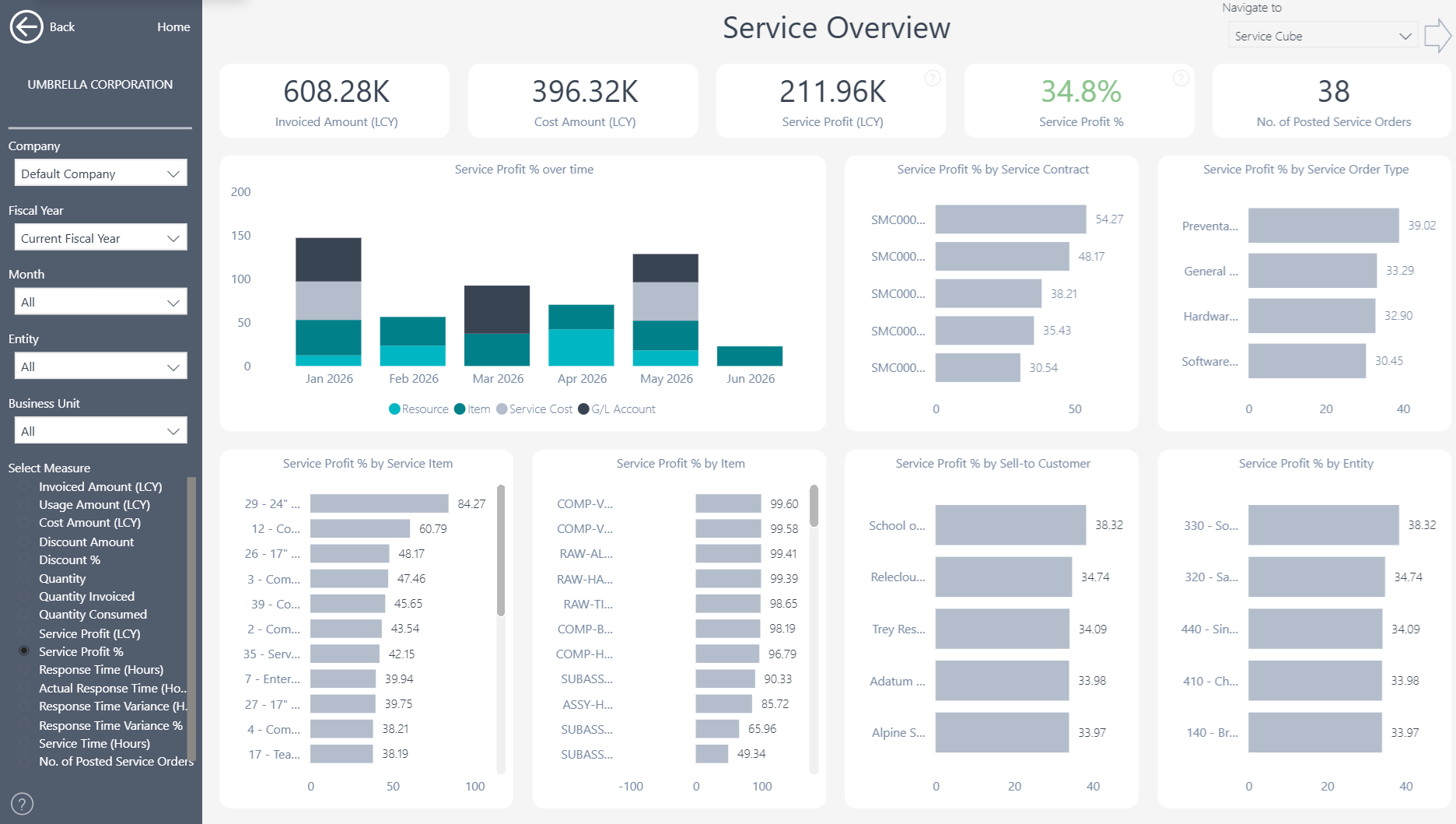
Service Insights gives Microsoft Dynamics 365 Business Central users 20+ ready-to-use Power BI reports. In addition, it helps service teams understand delivery, response times, profitability, faults, resolutions, and customer experience.
 |
 |
Power BI Service Reporting for Business Central
Turn Business Central service data into interactive dashboards that managers can use every day. Teams can assess performance, investigate delays and identify opportunities to improve service while controlling costs.
What You Can Analyze
Understand service performance, response times, recurring faults and profitability through one consistent reporting model.
- Service overview and performance by dimension or period
- Service response times and on-time performance
- Fault and resolution analysis
- Service profitability
- Service item and resource profitability
- Service orders and transaction-level detail
Users can filter the results by customer, service item, resource, period, company and other Business Central dimensions.
Improve Response Times and Customer Service
Compare service response times, on-time performance, faults and resolutions. For example, managers can identify recurring issues and see which customers, service items or resources contribute to them. Consequently, teams can investigate delays, allocate resources more effectively and improve the customer experience. It also provides consistent information for operational reviews and customer discussions.
Connect Service Performance with Profitability
Review revenue, costs and margins alongside operational service measures. Teams can identify which customers, service items and resources generate value and which areas require attention. By connecting service delivery with financial results, managers can improve performance without losing sight of cost control or profitability.
Investigate Performance from Summary to Detail
Start with the Service Overview and then filter results by company, customer, service item, resource, period or dimension. Users can also drill through to source entries and service order lines when they need more detail. As a result, teams can answer questions quickly and use trusted information during performance reviews, resource planning and service investigations.
Multi-Company and Flexible Analysis
Bring service information from multiple Business Central companies into one reporting view. Users can then filter and compare results by company, customer, service item, resource, fault, resolution, period and other relevant dimensions. At the same time, the consolidated view preserves access to individual companies, service orders and source transactions.
Reporting Without Custom Development
The ready-to-use Power BI app connects directly to Microsoft Dynamics 365 Business Central. This means service, finance and operational teams can start with proven reports instead of building every dashboard from scratch. Teams can also use the underlying semantic model to create additional Power BI reports or analyze trusted Business Central data in Microsoft Excel. In this way, the app provides a flexible reporting foundation without requiring extensive custom development.
Explore Service Insights
Learn more about , review current , or book a tailored .
Ready to explore your own Business Central service data? Start a .
Submit your review | |