

Updated · Originally published
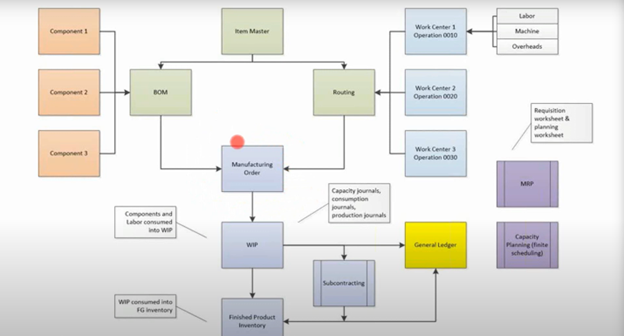
The execution of a production order is where all the planning, scheduling, and preparation come together. In , production orders are not just records—they're living documents that guide, track, and evaluate the manufacturing process from start to finish.
From Planning to Release: The Production Order Lifecycle
The lifecycle of a involves several stages:
- Simulated Orders: Used to test costs and schedules without impacting inventory or planning.
- Planned Orders: Generated by MRP to suggest what needs to be produced based on demand and inventory levels.
- Firm Planned Orders: Confirmed by the planner, locking them in for production.
- Released Orders: Sent to the shop floor for execution, allowing components to be consumed and labour to be tracked.
- Finished Orders: Closed with all costs and variances accounted for.
Each stage provides visibility and control, ensuring that no step in the production process is overlooked.
Flushing Methods: Ensuring Accurate Resource Consumption
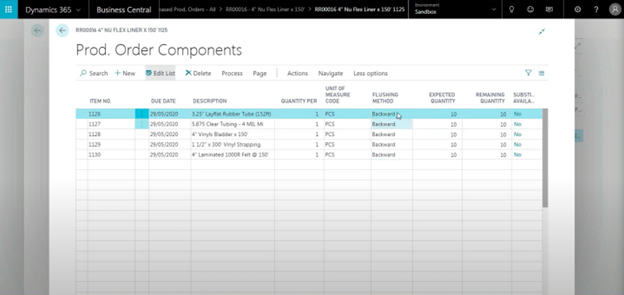
One of the most critical aspects of executing a production order is managing how resources—components, labour, and overhead—are consumed. Business Central offers three flushing methods:
- Backward Flushing: Automatically consumes resources when the production order is marked as finished.
- Forward Flushing: Consumes resources at the start of production.
- Manual Flushing: Requires users to report exact quantities consumed during production.
Backward flushing is the most common method for small to medium-sized businesses, offering a balance between automation and accuracy. However, manual flushing provides precise tracking for industries where variability in resource usage is common.
Tracking Costs and Variances
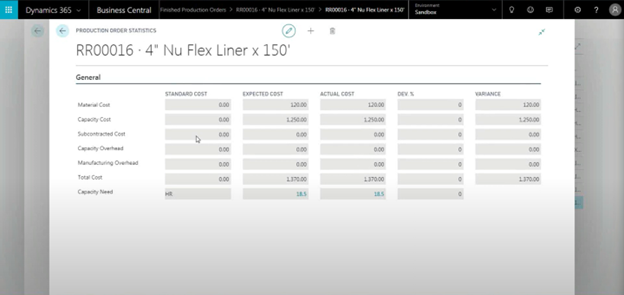
Business Central tracks every cost associated with a production order, from labour and overhead to raw materials. Key features include:
- Cost Rollups: Summarize all costs to calculate the total cost per unit produced.
- Variance Analysis: Highlight discrepancies between expected and actual costs, helping you identify inefficiencies.
- Real-Time Cost Monitoring: View updated costs at any stage of production.
For example, if a production run uses more components than expected, the system flags the variance, enabling you to investigate and make adjustments.
Take Action: Watch Manufacturing Order in Business Central
This video explores the manufacturing orders module in Microsoft Dynamics 365 Business Central, starting with foundational setup elements such as item masters, routings, and Bills of Materials (BOMs). It then walks through the full production order lifecycle, explaining how components are consumed, labor is charged, and work centers are managed throughout execution. The session concludes with an overview of variance analysis and reporting opportunities, including how production data can be analyzed using Power BI.
Next Steps
Production order execution and costing are foundational to running efficient, profitable manufacturing operations in Dynamics 365 Business Central. Once you understand how these processes work, the next step is ensuring they’re configured and used correctly for your specific production environment.
Whether you’re planning a or looking to optimize your existing setup, Rand Group can help. Our team supports manufacturers through, , and —helping ensure production processes, costing methods, and reporting align with how your business actually operates.
If you’d like to review your production setup or take the next step toward improving execution and cost visibility, to get started.