

Updated · Originally published
Analyzing Accounting Health in Dynamics 365 Business Central
In today's fast-paced business environment, maintaining the health of your accounting data is crucial for operational efficiency. This blog post dives into the essential accounting metrics you can analyze using the from in . This is part of our for Business Central. By regularly checking these metrics, you can ensure that your Business Central Data is accurate and up-to-date, ultimately supporting better decision-making for your organization.
If you would like to follow along, please download our
Getting Started with the Health Check App
Before diving into the specific metrics, it’s important to ensure that you have the Health Check application set up correctly. If you haven't done this yet, we recommend checking out the initial , as it is a key prerequisite for optimal performance in subsequent analysis videos.
Key Metrics to Analyze
Once you have the application set up, you can navigate directly to the dashboard to begin your analysis. The metrics we will examine in this post are:
- Bank Account Posting Group Subledger to General Ledger Balances
- Subledger to General Ledger Balance Checks for Accounts Receivable, Accounts Payable, Inventory, and Prepayments
- Balance by Bank Account Analysis
- Customer Balance and Late Payer Indicators
- Direct Posting Warnings
- Number Series Warnings
- Shipped Not Invoiced and Old Sales Document Indicators
- Received Not Invoiced and Old Purchase Document Indicators
These metrics serve as critical indicators of your accounting health. Think of them as your “check engine light” for financial data. Regularly reviewing these metrics is recommended as part of your month-end checklist.
Bank Account Posting Group Balances
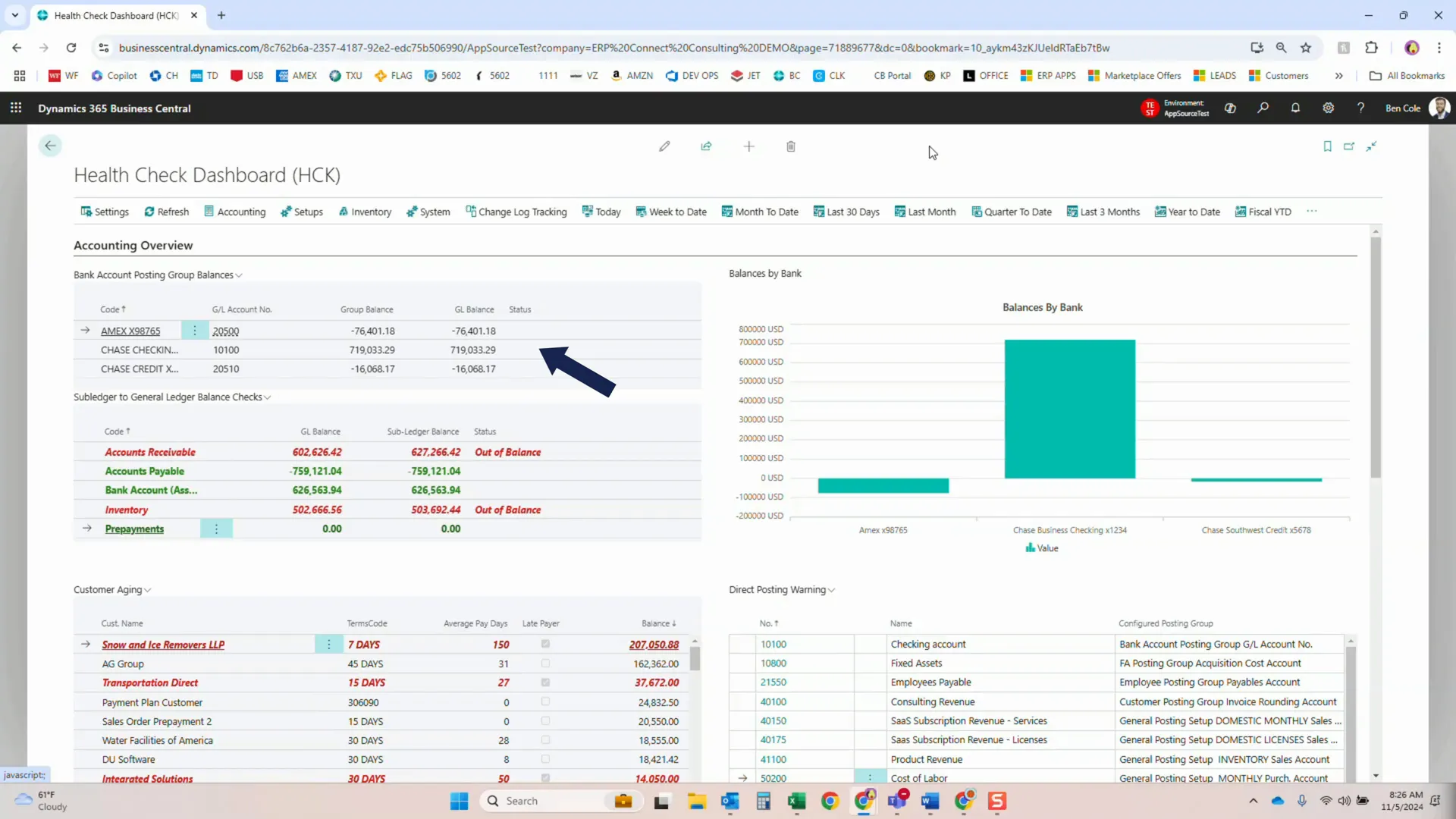
The first metric focuses on how each bank account is tied to its corresponding General Ledger (GL) account through the . Best practices dictate that each bank account should maintain a one-to-one relationship with its GL account (and Bank Account Posting Group). This structure is key for your reconciliation process and ensures a smooth month-end close.
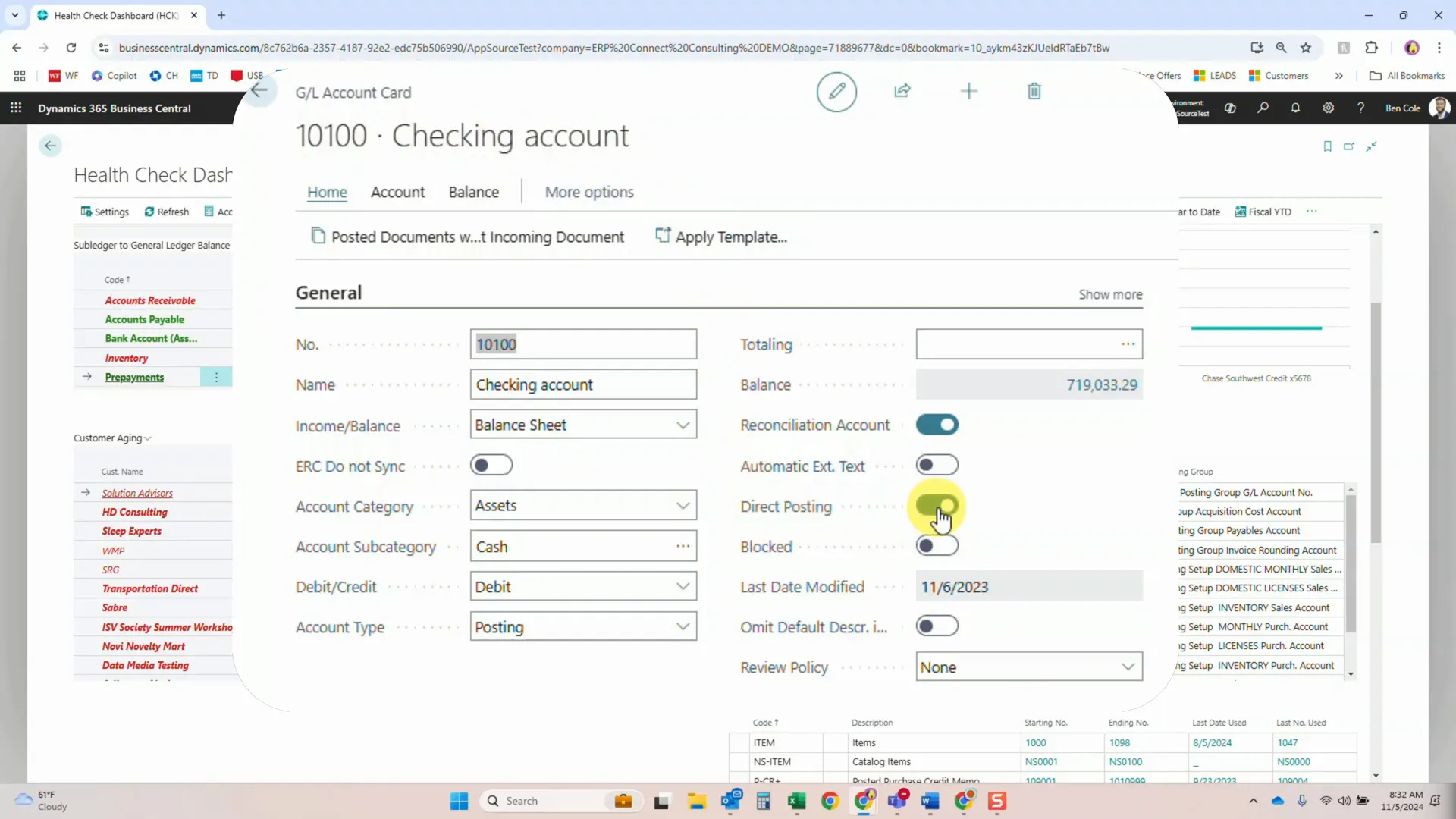
If these do not tie out, it may indicate that entries were made directly to the GL instead of through the bank account subledger. This can complicate your reconciliation efforts and it is always recommend that these GL Accounts have . More to come in our "Direct Posting Warnings" below.
Subledger to General Ledger Balance Checks
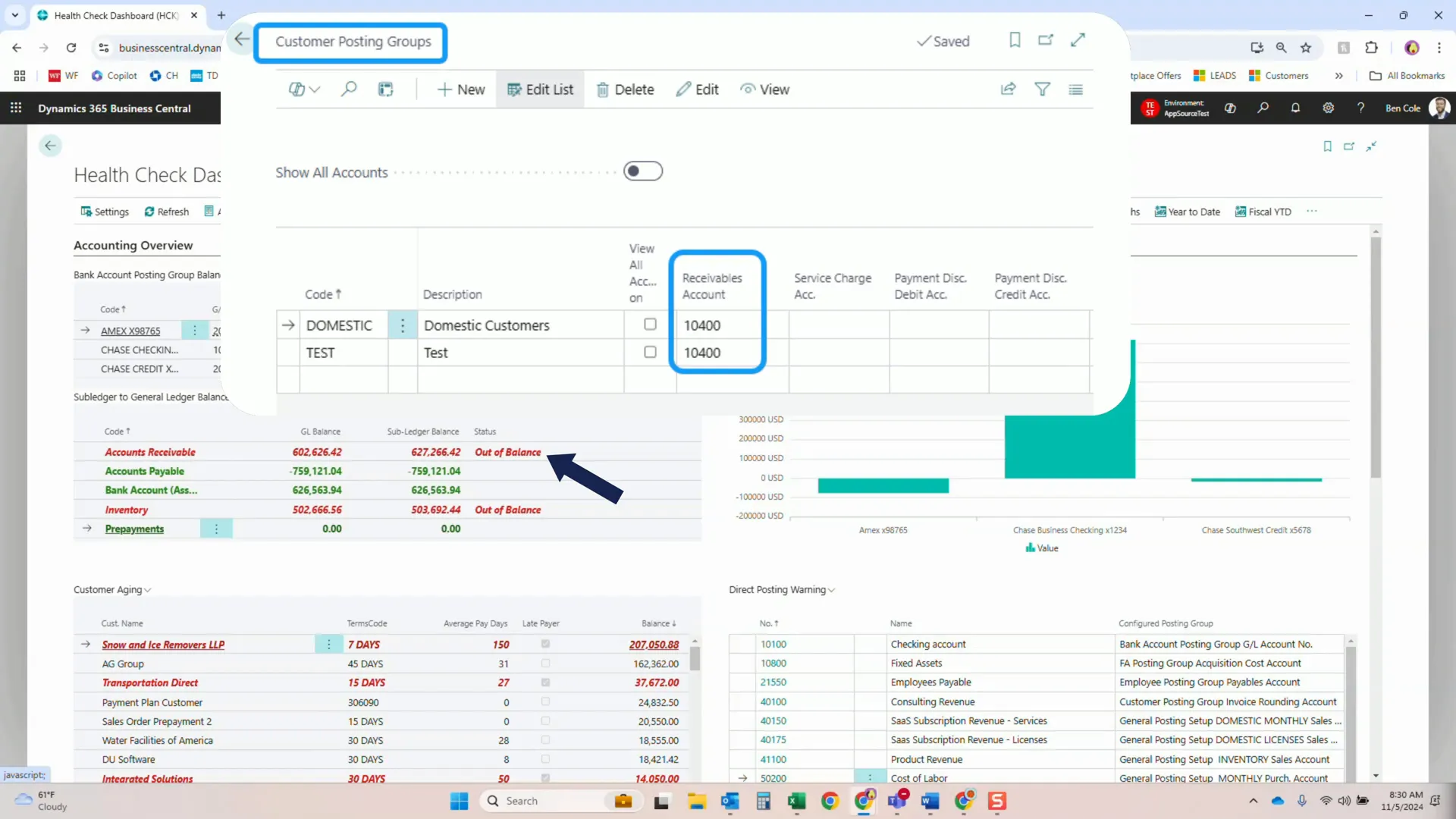
Next, we will analyze the Subledger to General Ledger Balances Checks. Looking at our first indicator, each customer’s activity should be linked to an Accounts Receivable (AR) account found in their Customer Posting Group. If these numbers do not align, it may suggest that someone inadvertently posted directly to AR without tying it to the respective customer account, which is a significant issue that needs to be rectified.
In this analysis, we also check the Accounts Payable (AP), Bank Accounts, Inventory, and Prepayments. All of which will be key in ensuring data integrity throughout your system.
Balance by Bank Account Analysis
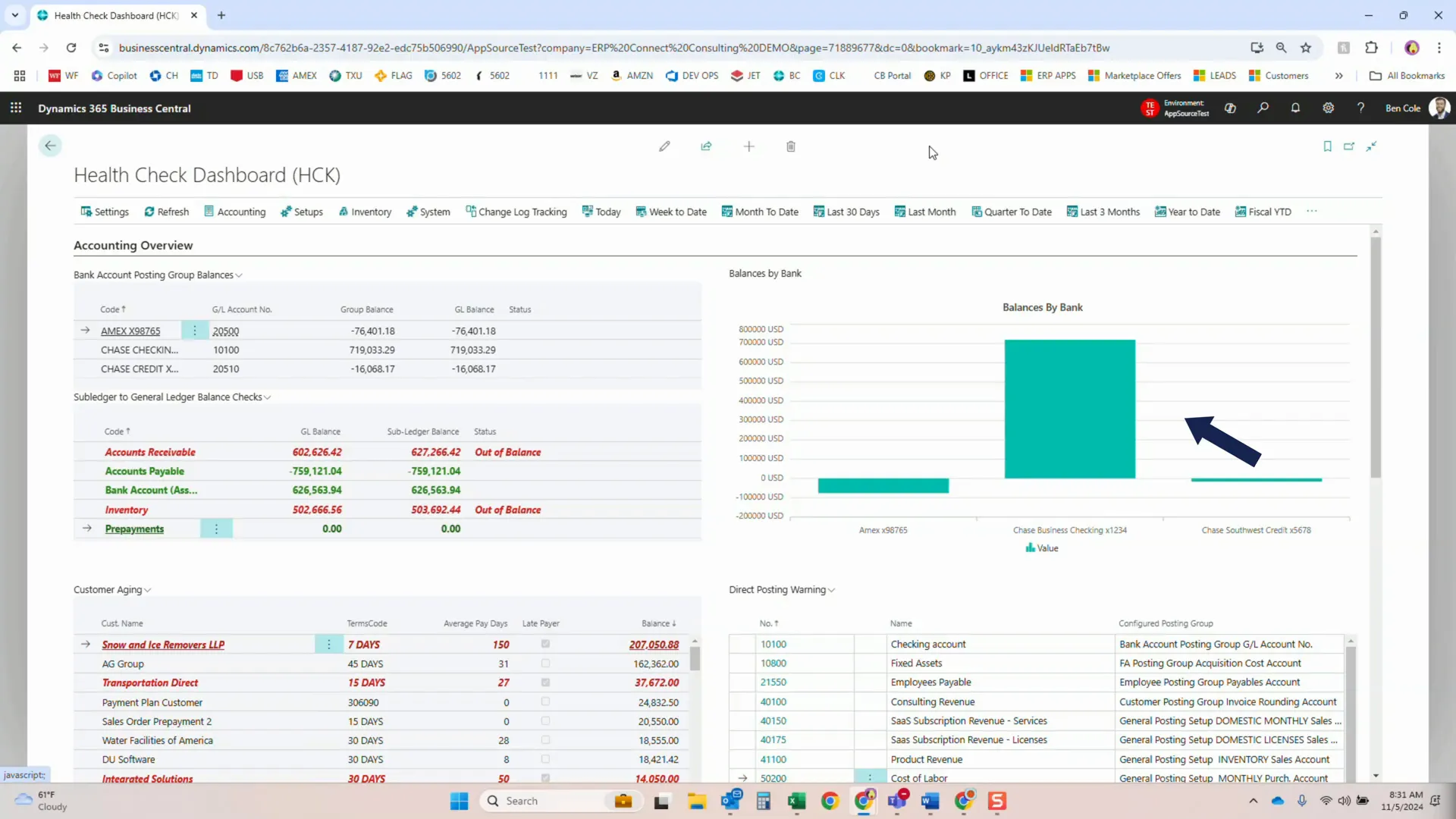
Another critical metric to monitor is the Balance by Bank Account. This analysis helps you assess your cash position to ensure you have sufficient funds to cover liabilities, including credit card debts. It’s essential to take a qualitative approach to this analysis, considering the size of your business and cash requirements.
Customer Balance and Late Payer Indicators
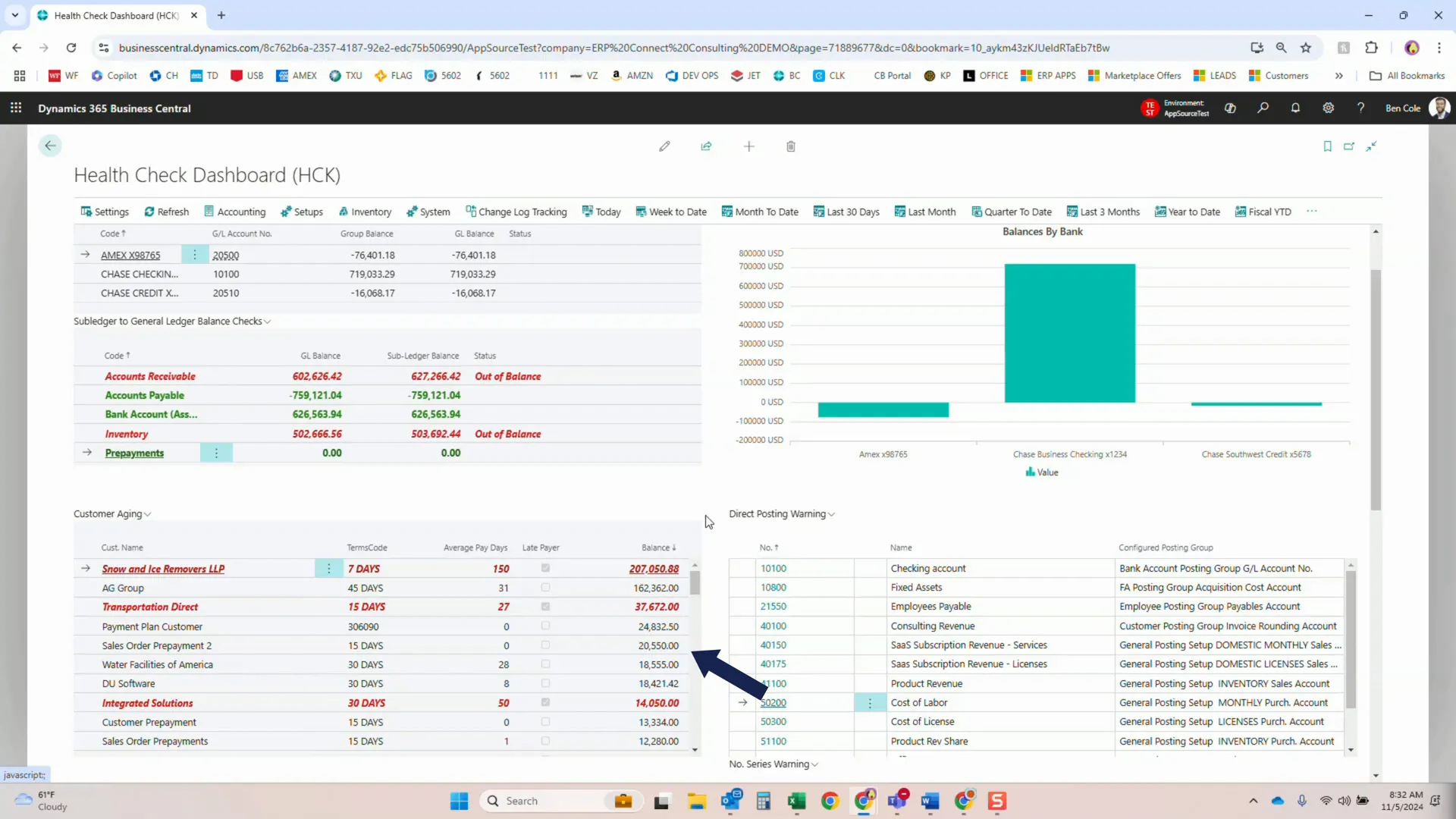
Customer Aging Reports are vital for understanding your cash flow. The Health Check application highlights customers whose average payment days exceed their payment terms, marking them as late payers. You can filter and sort these customers by various criteria, including average paydays, late payer indicators, and outstanding balances.
This metric also allows you to drill down into specific customer ledger entries, making it easy to manage unpaid invoices or apply unapplied payments directly from the dashboard. This proactive approach can significantly enhance your cash management practices. For more in depth analysis, check out our
Direct Posting Warnings
Direct Posting Warnings are another key feature of this application. If you have GL accounts that are being posted to through subledgers, we advise you to keep direct posting turned off. Exceptions can be made for income statement accounts, but balance sheet accounts (like the ones we saw above) should always post through the respective Subledger. This ensures that the GL is updated automatically based on the posting group tied to your master data (Like Customers, Vendors, and Bank Accounts to name just a few). For a deeper dive into Direct Posting, please check our this great from one of our partners.
Number Series Warnings
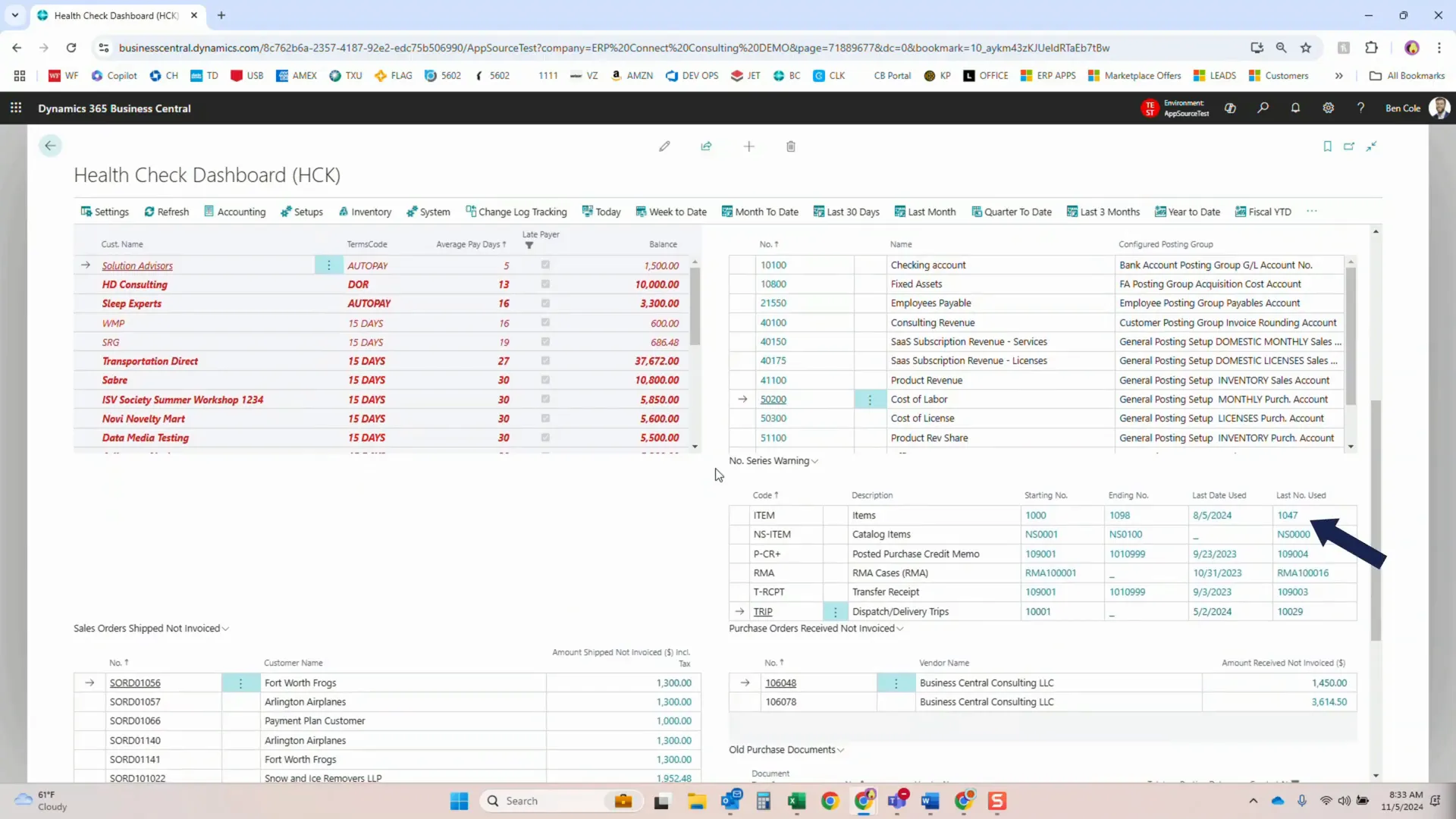
Monitoring your is crucial for maintaining operational efficiency. The Health Check application will alert you when your ending number approaches its limit (Defined in the Health Check Setup). For instance, if the last number used is nearing the ending number set in your number series, you’ll need to update this to avoid disruptions in creating new records.
Staying on top of your number series helps prevent operational hiccups, particularly as you scale your business activities and processing volume.
Shipped/Received Not Invoiced and Old Sales/Purchasing Documents
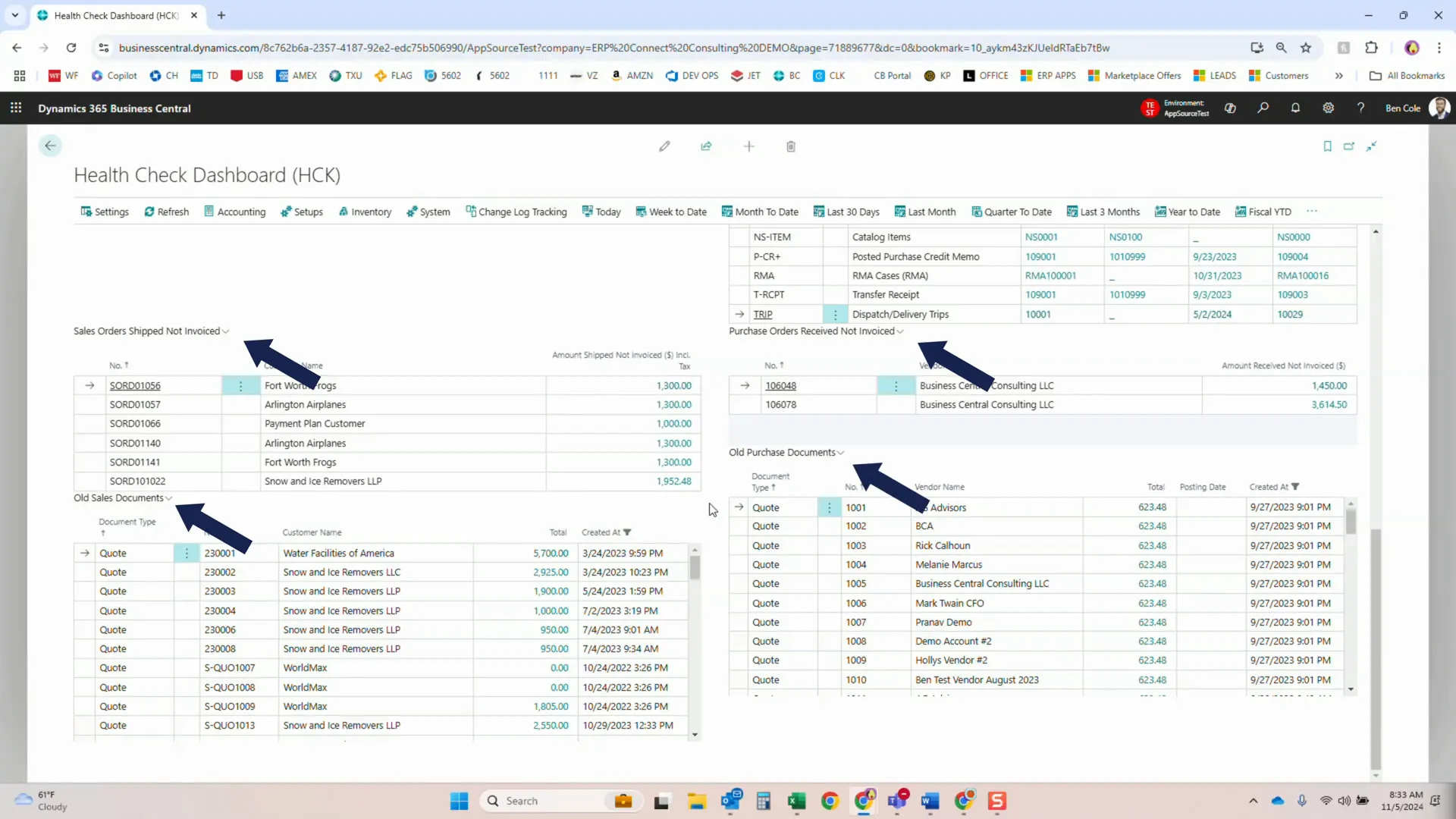
Finally, pay attention to the indicators for shipped not invoiced and received not invoiced documents. These metrics reveal sales orders from your customers that have been shipped but not invoiced, as well as purchase orders received without invoices from vendors. Addressing these documents promptly is essential, as delays can complicate revenue recognition and inventory management.
Old sales and purchase documents should also be reviewed regularly. The allows you to set a date range to quickly identify and clean up outdated documents, thus maintaining accurate and current records.
Conclusion
In conclusion, running regular health checks using the metrics provided by the can help you maintain the integrity of your data in Dynamics 365 Business Central. We recommend incorporating this analysis into your month-end close routine to identify any discrepancies and ensure everything is in order.
If you discover any indicators that require further investigation, our team at is here to assist you.
For a full list of available FREE Health Check Indicators, check out our YouTube Series Below:
By routinely checking these key accounting indicators, you can ensure the financial health of your organization, much like getting a regular check-up with your doctor or oil change on your vehicle. If you have any questions or comments, please feel free to reach out to our team at [email protected].